- Joined
- Jan 27, 2014
- Messages
- 3
- Reaction score
- 0
Hi 3CX/VOIP experts,
I've started testing the 3CX system with my SPA3102. I configured my SPA3102 and 3CX system as described in the post in the 3CX section.
The issue that is driving me to insanity is... I am able to receive PSTN calls through my 3CX extensions fine, but when trying to dial "9,XXXXXXXX" on my 3CX client I get an "temporarily unavailable"
On the Server Event Log I get:
Event Type: Warning
Source: 3CXPhoneSystem
Description: Call or Registration to XXXXXXXX@(Ln.10000@KrustyHouse) has failed. [v4 0.0.0.0:0 UNKNOWN_TRANSPORT target domain=unspecified mFlowKey=0] replied:408 Request Timeout: internal
My SPA-3102 has sw ver 5.2.13(GW002) hw ver 1.4.5(a)
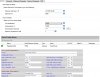
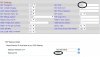
Line 1 is disable
PSTN Line is enabled
VoIP-To-PSTN Gateway is enabled
One stage diabling is set to Yes
Voip Caller Auth Method "none"
On my 3CX the port/trunk shows "registered (idle)" and green. configured as a Gateway.
Hope to get insight for this issue...
Regards,
Enrique
I've started testing the 3CX system with my SPA3102. I configured my SPA3102 and 3CX system as described in the post in the 3CX section.
The issue that is driving me to insanity is... I am able to receive PSTN calls through my 3CX extensions fine, but when trying to dial "9,XXXXXXXX" on my 3CX client I get an "temporarily unavailable"
On the Server Event Log I get:
Event Type: Warning
Source: 3CXPhoneSystem
Description: Call or Registration to XXXXXXXX@(Ln.10000@KrustyHouse) has failed. [v4 0.0.0.0:0 UNKNOWN_TRANSPORT target domain=unspecified mFlowKey=0] replied:408 Request Timeout: internal
My SPA-3102 has sw ver 5.2.13(GW002) hw ver 1.4.5(a)
Line 1 is disable
PSTN Line is enabled
VoIP-To-PSTN Gateway is enabled
One stage diabling is set to Yes
Voip Caller Auth Method "none"
On my 3CX the port/trunk shows "registered (idle)" and green. configured as a Gateway.
Hope to get insight for this issue...
Regards,
Enrique