Outbound rule to call all numbers like .T

Status
Not open for further replies.

Quest4Voice

Free User
Joined
Jan 28, 2020
Messages
71
Reaction score
2
Good day,

I am new to 3CX I must say you videos are okay but I don't find deep troubleshooting data. I have 15 years experience with other vendors

  1. I want to know how i can make one out bound rule that will allow me to call any number ( Local, Trunk & International call). What character should i put to allow me call all numbers.
  2. I want a place where i can find my SIP logs i cant find then here..C\programData\3CX\Data\Instance\Logs i dont have his in my installation. its V15.5.15502
  3. I cant locate where to do a packet capture from am running V 15.5.15502

Thanks in advance
 
why not starting with actual V16SP4 Pbx release instead of 15.5SP6
 
Hi @Quest4Voice

I'm glad you like our videos and I suggest you watch some more which cover exactly what you asked for. You can watch the pre-recorded webinar if you click this here for all our Academy subjects
View attachment 14125

1.) Outbound rules https://www.3cx.com/3cxacademy/videos/advanced/configuring-outbound-routing/

2 and 3.) Logs and Capture: https://www.3cx.com/3cxacademy/videos/advanced/basic-troubleshooting/

These are the videos that am saying are shallow .... in those videos there is no mention of how i can use one rule to call all numbers??? gone through all your videos before .....
 
The video explains to you how the outbound rules work, it will not go through all possible scenarios obviously.

Once you learn how it works, you can make the rules do whatever you want, including a single rule to call all numbers. So basically it covers what you asked for.

Have you tried to make a rule and test it yet? Experiment with it to better understand how it works
 
@JohnS_3CX

what am asking for is not rocket science.... i think...

Other Vendors namely Cisco .T or just the dot means any numbers am basically asking what is the equivalent in 3CX is it "&" what single character matches any number dialed....

I have been trying to get on this webex session 3CX Product Training – Advanced – Part 2 which says it will start round about this time still cant seem to log in....

will greatly appreciate a pointer i have played the video and i think the basic is allow all then block all calls.....

thanks
 
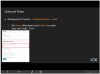
What you are requesting, specifically is in the video and in the slides. Specifically, in Slide 11 I do mention that this is a very generic rule.

14128

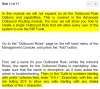
Opening the speaker notes this is also mentioned in writing as well.

14129

What you are essentially asking for is mentioned entirely and in full.

Also, finding the logs in 3CX is very easy.

All you need to do, is go to the Activity log:

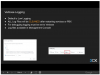
In the videos, this would be in the Advanced module "Basic Troubleshooting". Go to Slide 4

14130

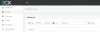
From the Activity log (This is available through the big blue button in the dashboard)

14131

From here you can see the logs button, as well as the packet capture utility. You dont even need to access the operating system file system.

14132

The troubleshooting webinar will be hosted tomorrow at 9am UTC. The webinar you were trying to join has ended just over 1.5 hours ago, which is the reason you were not able to join.

You are more than welcome to register for tomorrows webinar, where this will be covered, and demonstrated.
 
  • Like
Reactions: apostolis_3CX
What you are requesting, specifically is in the video and in the slides. Specifically, in Slide 11 I do mention that this is a very generic rule.

View attachment 14128

Opening the speaker notes this is also mentioned in writing as well.

View attachment 14129

What you are essentially asking for is mentioned entirely and in full.

Also, finding the logs in 3CX is very easy.

All you need to do, is go to the Activity log:

In the videos, this would be in the Advanced module "Basic Troubleshooting". Go to Slide 4

View attachment 14130

From the Activity log (This is available through the big blue button in the dashboard)

View attachment 14131

From here you can see the logs button, as well as the packet capture utility. You dont even need to access the operating system file system.

View attachment 14132

The troubleshooting webinar will be hosted tomorrow at 9am UTC. The webinar you were trying to join has ended just over 1.5 hours ago, which is the reason you were not able to join.

You are more than welcome to register for tomorrows webinar, where this will be covered, and demonstrated.
Thanks Nicholas you answered everything i was asking thank you so much... I will run with this.
 
Status
Not open for further replies.

Forum statistics

Threads
111,935
Messages
589,823
Members
164,817
Latest member
Innovative Advisory