Outbound setup for specific SIP trunk

Status
Not open for further replies.

Smallguy

Free User
Joined
May 29, 2020
Messages
31
Reaction score
4
Hi community!

I'm a bit struggling with my outbound rule.
Here's my scenario.

I've got 2 sip trunks (Lets call them A & B), both allow outbound calling
I've got an extension (10) that need to switch between A&B to use outbound calling.
I read something with a prefix to use and then strip that prefix number again...? Not clear to me.

How to set up the rule to have extension ie: 10 to use A and/or B for outbound calling while the sipnumber of A/B will be displayed at the receiving end.
Hope I make sence here...?

In other words. How can you call out with different numbers to represent yourself as a caller from company A of B

Thanks Robert
 
Hi @Smallguy,

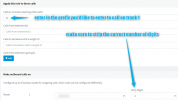
You can do this by creating 2 separate outbound rules (from Management Console >> Outbound Rules >> Add) . For example Rule #1 can have calls starting with 11 route through Trunk 1 and then strip 2 digits (the 11 from the front).

1616058243251.png

Repeat this for your second trunk.
 
Thanks, life can be that simple...!!
 
  • Like
Reactions: VasilisV_3CX
@VasilisV_3CX Ok, let's take my next challenge.
Now he also needs to call 99+41somenumber to dial international or 990041somenumber ?
Which route rule will apply here...?
 
For your international calls with the 99+, you could add another rule that calls numbers starting with 99+, then strip 3 digits and prepend 00.
 
That's not working...?
I'll give an explicit example
A: 99+31612345678
B: 990031612345678
what rules should apply to these

Then another international rule is somehow not working for me also
C: +31612345678
D: 0031612345678
what rules should apply to these
 
Hi @Smallguy,

You'll need 2 rules per sip trunk. 1 rule for the choosing of SIP trunk, like 99 for SIP 1 or 11 for SIP 2, and then 1 rule for the + symbol to be replaced with 00.

- In my rule above, 99+31612345678 will become 0031612345678 by stripping 3 digits and prepending 00.
- In the first example I gave you, 990031612345678 will output 0031612345678 by stripping 2 digits.

Have you enabled international calls? Check Settings >> Security >> Allowed Country Codes.

For more info, check our 3CX Academy presentation on Outbound Rules: https://www.3cx.com/3cxacademy/videos/basic/configuring-voip-providers/
 
Call me stupid, I do have local numbers working also with the 99 prefix where strip 2 digits and Prepend is empty.

I do have Security settings enabled to call international on every continent

Unfortunately any rule for 99+ is not working no matter how many digits I strip with a 00 prepend. I get 'Forbidden' in the 3CX app. Any suggestions?
 
Hi @Smallguy,

This could be an incorrect number being dialled, the symbol + may be required by your provider rather than 00, which is something you'd need to check with them.

It could also be a setting in the Windows App under Settings (2 cogs), Configure Accounts >> double click your account >> Advanced >> scroll to the bottom and make sure that 'Replace + with 00' isn't enabled.
 
Ok, I found my solution. You're correct I need to use 00 instead of + to go international (so far, I still have to ask the sip provider, anyway)

For normal extensions to use sip 1 at international calls: I have prefix 00, strip 2 digits and 00 prepend
For the 99 prefix extension to use sip 2 at international calls: I have prefix 9900, strip 4 digits and 00 prepend
 
  • Like
Reactions: VasilisV_3CX
@VasilisV_3CX
Just got word from the sip provider that does not allow '+' dialing, so to workaround this I could use a rule like:
+, strip 1, 00 prepend?
However I still get the sip provider message that the number does'nt exist, or is not allowed by the sysadmin.

What rule do you have to get rid of the + and have people use their existing phonebook with numbers that start with + ??
 
Hi @Smallguy,

+, strip 1, 00 prepend
If the rule is matched, then this will work as intended, stripping the + and prepending 00. It won't be sending your provider a + symbol.

Something to check would be if E164 Processing is enabled in the Settings >> E164 Processing. Try and uncheck it and test again.
 
Hi @VasilisV_3CX,
Ok unckecking E164 solved partly. However when I use 99+31, strip 5, 0 prepend which will then generates a local number starting 0 is not working. As also 99+, strip 3, 00 prepend, same thing, also 'not allowed'
 
ahhhh, so close.... :rolleyes:
 
Status
Not open for further replies.