Solved Outgoing number call ID different for each user

Status
Not open for further replies.

STI-David

Gold Partner
Joined
Mar 1, 2023
Messages
63
Reaction score
7
Hosted dedicated.
sip trunk from Voip.ms

Every user has their own DID and some want their DID number showing on outgoing calls (instead of main company number for most users).

I am able to change the outgoing name ID, but not the number.
Any suggestions?

Thank you,
David
 
Set the ID on the Caller ID field in the 3CX management console per extension.
Do not have the CID set on the outbound rule as this will override it.
 
  • Like
Reactions: YiannisH_3CX
Set the ID on the Caller ID field in the 3CX management console per extension.
Do not have the CID set on the outbound rule as this will override it.
Thanks for the reply.
To be clear, I want outgoing number to display.

I'm looking in the Outbound rule and I don't see where to configure CLID. It only has fields to apply rules when dialing certain numbers to various routes.
The users are in Default group, also there I don't see any place for this.

What am I missing?
David
 
If you have set the DID number against each extension, and the outbound rule you are using does not have a CID set, yet the main number is still being sent, then it may be one of two things...

your provider does not allow the DID number, and is overriding, or, the 3CX outbound trunk parameters need to be changed, to allow the DID to be sent.

Those parameters are mentioned in this thread, what requires changing will depending on your provider. Some changes can break all outgoing calls to tread carefully.

https://www.3cx.com/community/threads/caller-id.64590/#lg=attachment10106&slide=0

I would first confirm, with the Activity log, exactly what caller ID you are now sending.
 
Last edited:
Thanks for the reply.
To be clear, I want outgoing number to display.

I'm looking in the Outbound rule and I don't see where to configure CLID. It only has fields to apply rules when dialing certain numbers to various routes.
The users are in Default group, also there I don't see any place for this.

What am I missing?
David
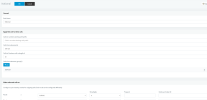
Can you show a screenshot of what you see?
 

Attachments

  • Screenshot 2023-04-03 at 15-48-39 3CX Phone System Management Console.png
    Screenshot 2023-04-03 at 15-48-39 3CX Phone System Management Console.png
    48.3 KB · Views: 86
I am testing using my Partner account, don't want to mess up client system.
 
Bottom right of your screenshot shows the outbound caller ID field.
 
  • Like
Reactions: Evolute IT
Bottom right of your screenshot shows the outbound caller ID field.
Correct, that field would allow me to insert the company name or a number. However, that is a global rule and the system I'm asking about has about 30 DID's and respective users want to have their outgoing DID number displaying when they call out.

David
 
Correct, that field would allow me to insert the company name or a number. However, that is a global rule and the system I'm asking about has about 30 DID's and respective users want to have their outgoing DID number displaying when they call out.

David
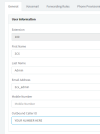
In that case leave the outbound rule blank and put a users DID in the user's field

1680553835004.png
 
  • Like
Reactions: Evolute IT
In that case leave the outbound rule blank and put a users DID in the user's field

View attachment 34997I

I tried that earlier and the called party received the DID number above the company main number (in lieu of the name and number). e.g. 4161234567 above 4165551212
 
Caller ID Name and Caller ID Number are 2 things.

NAME is powered by CNAM databases, which each major carrier has "a copy" and they resync with others once a month or so. Which they might not do at all in some carrier setups. You would have to submit a database update to your carrier if the NAME is wrong to get it corrected.

Sounds like the "NAME" associated with the DID is actually the main number here.

Caller ID Numbers are fairly straightforward and that's what 3CX sends out based on that field (Outbound rule overrides Extension overrides Trunk in case you have them defined differently.)
 
sip trunks
trunk
caller id
default outbound caller id = empty
-------------
users
user 101
general
outbound caller id = empty
------------------
outbound rules
rule "national"
route 1 VoIP.MS
Outbound Caller ID = empty
--------------
Given that all the fields discussed are empty, the main number must be forced from sip provider - voip.ms
Perhaps there's a setting I need to change.
Will advise what happens.
David
 
I got really confused reading this thread. If the above fields are empty, meaning that you have no outbound caller ID set to the extension level or trunk level or even the outbound rule level, then the main trunk number will be sent.

There are 4 options / settings for setting up an outbound caller ID.

1. Outbound caller ID option in outbound rule - If this is set it overrides all other options so it does not matter what you have set in other options.
2. Outbound caller ID in extension settings - If no outbound caller ID is set in outbound rules then this has the highest priority.
3. Caller ID in trunk settings, Caller ID tab. This has the next highest priority. If the 1 and 2 are not set then this will be sent.
4. Main trunk number. If 1,2 and 3 are empty the main truk number will be used as the caller ID for outbound calls.

Hopefully this helps.
 
You are sending the DID number, you just need to get the name changed.

I would talk to your carrier, as it would seem that they are attaching the main number, as a name. If that is the case, then perhaps they can substitute your business name instead. The other option, is that they allow you to send a name, which they will honour.
 
  • Like
Reactions: Evolute IT
@YiannisH_3CX Thank you for your clearly put explanation.
@leejor Thanks for the tip.

I reached out to voip.ms and I was able to change the account number display setting to "my system can generate own CLID" or similar wording.
In the 3CX user settings, I was able to get the DID to display, however, now the company name is missing. I thought it might pickup the users name instead, but no. The company name is still set in the voip trunk in Default Outbound caller ID
So it's a semi-success.
Any suggestions to get name showing?
David
 
Your provider can probably take care of the company name but you can also send either the company name for all calls or the extension name of each user. This is not guaranteed to work but you can test it.
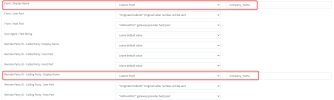
For Voip.ms to set a system wide company name go to your trunk settings and apply the changes highlighted in the screenshot below:

1680676755470.png

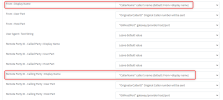
To send the name of the extension making the call configure like this:


1680676668691.png


Test it and let us know if it works.
 
Your provider can probably take care of the company name but you can also send either the company name for all calls or the extension name of each user. This is not guaranteed to work but you can test it.
For Voip.ms to set a system wide company name go to your trunk settings and apply the changes highlighted in the screenshot below:

View attachment 35016

To send the name of the extension making the call configure like this:


View attachment 35015


Test it and let us know if it works.
It works well, I changed the settings for extension name, per your second screenshot. Thanks for your help.
David
 
  • Like
Reactions: YiannisH_3CX
Glad we could assist.
 
Status
Not open for further replies.

Forum statistics

Threads
111,974
Messages
590,081
Members
164,899
Latest member
mazet