Outlook Not Showing up in Integration in Softphone

Status
Not open for further replies.

jmiller

Joined
Aug 1, 2016
Messages
16
Reaction score
3
I just upgraded to the Pro version and trying to get the softphone to sync with Outlook. When I go to Settings | Advanced Settings | Integration Outlook is not listed. The plugin is installed and working in Outlook itself.
 
In order to Use the Outlook plugin you need to do the following:

1) From Management Console go to Extension > Edit your Extension > Go to Integration tab and enable the option : Enable Integration. From the list select the Outlook.zip and press OK
2) From 3CXPhoneForWindows you need to Restart the Client

Then go to Settings > Advance Settings > Integration.
Please let me know if you managed to make it work
 
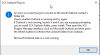
It shows up but errors when I click on it. It also throws up two error dialog boxes when I open Outlook. It then shows two addins for 3cx. I can disable one but the 3cx phone client still gives the error when I click on Outlook (see attachment).
 

Attachments

  • Outlook Error.png
    Outlook Error.png
    10.6 KB · Views: 72
ok, got it to work. I had downloaded the 3cx plugins from the website and it must have been conflicted with the console version? Not sure but it works now. Thanks.
 
Will the 3CX client pull in Outlook contacts or do I have to go to Outlook to make the call? I was thinking that the 3CX client would sync with Outlook and pull the contacts from Outlook into the contacts section of the 3CX softphone.
 
I will explain how the 3CX Plugins works.

When there is an incoming call to your 3CXPhone , the plugin will search through your Outlook contacts.
If the Contact exists in your Outlook account , then it will show the Contact Info of that Contact.
If the Contact DOES NOT exist then it will create a new Contact on your Outlook account with the incoming call number.

If you want to configure the Settings of the Plugin , then from 3CXPhone > Settings > Advanced Settings > Outlook > General you can change the Behavior of the Plugin.

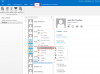
You also have the ability to Click2Call via Outlook. [Please see attachment]
That means you can select the Contact and the Number you want to make a call and just click on it.
Then from 3CXPhoneForWindows the number will be copy in the clipboard.
 

Attachments

  • Click2Call.PNG
    Click2Call.PNG
    86.8 KB · Views: 72
Status
Not open for further replies.

Members Online Now

Forum statistics

Threads
111,852
Messages
589,384
Members
164,690
Latest member
rick.yamamoto