I will explain how the 3CX Plugins works.
When there is an incoming call to your 3CXPhone , the plugin will search through your Outlook contacts.
If the Contact exists in your Outlook account , then it will show the Contact Info of that Contact.
If the Contact DOES NOT exist then it will create a new Contact on your Outlook account with the incoming call number.
If you want to configure the Settings of the Plugin , then from 3CXPhone > Settings > Advanced Settings > Outlook > General you can change the Behavior of the Plugin.
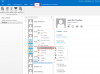
You also have the ability to Click2Call via Outlook. [Please see attachment]
That means you can select the Contact and the Number you want to make a call and just click on it.
Then from 3CXPhoneForWindows the number will be copy in the clipboard.