Solved Paging causes phones to stay on and appear as on the phone afterwards

Status
Not open for further replies.

Steve Medley

Customer
Basic Certified
Joined
Mar 15, 2018
Messages
34
Reaction score
1
Hi,

I have a client with an 18 phone setup, Yealink T46S phones. I setup a paging extension to intercom to everyone as they use that feature more often than dialing extensions.

However there seems to be an issue where when you page everyone randomly phones will remain in the "on" state afterwards and you have to manually end the call on them otherwise it will show them as on the phone and send any calls to voicemail.

Is this a known issue with a fix or workaround?
 
Hello @Steve Medley

Please give us a few detail about the installation so can better try and help.
What version PBX are running?
Are the phones local to the server or remote?
If remote are you using STUN or SBC?
Are you using the default template and the supported firmware?

Are you using paging or multicast paging?
Do you see the extensions as busy in the Active calls in the Dashboard of the management console when this happens?
 
I am running version 15.5.10244.4
All phones are local to the server.
Default template and supported firmware.
Using paging, not multicast.
The extensions show as busy on BLF and if you call them it will go to voicemail. To fix it the user has to manually push the hangup button on their phone. As for the Active Calls in the Dashboard I hadn't checked there, I will have someone test it out and check.
 
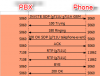
Paging works like a normal call, the only difference is the PBX tells the phones to auto-answer the call and the Invite is sent to multiple destinations.
To troubleshoot this i would recommend running a capture on the PBX machine to check if the signalling between the server and the phones is ok.
You should see on Invite from the PBX to each of the extensions that are part of the group. Once the call is done there should be a BYE message from the PBX to the extensions and if received by the extension there should be a 200 OK message.
2018-05-24_10h06_36.png
 
Paging works like a normal call, the only difference is the PBX tells the phones to auto-answer the call and the Invite is sent to multiple destinations.
To troubleshoot this i would recommend running a capture on the PBX machine to check if the signalling between the server and the phones is ok.
You should see on Invite from the PBX to each of the extensions that are part of the group. Once the call is done there should be a BYE message from the PBX to the extensions and if received by the extension there should be a 200 OK message.
View attachment 7813

It looks like it was the Windows Client that was causing the problem, both the physical phone and Windows Client were picking up the page, we just didn't notice because nobody there has speakers except one person. Once I set the Windows Clients to desktop phone mode (since they are only using it for IM anyways) the phones began acting properly.
 
Glad to see the issue has been resolved and thank you for updating the thread with your solution.
 
Status
Not open for further replies.

Latest Posts

Forum statistics

Threads
111,885
Messages
589,547
Members
164,745
Latest member
Herm77