Passing of CLI to Digital Receptionist

Status
Not open for further replies.

Shobosh1

Free User
Joined
Dec 17, 2021
Messages
3
Reaction score
0
Dear all,

On an inbound call, which is greeted by the "Digital Receptionist", I have set up two options: -

Option 1. Call emergency number.

I have set up two user extensions, each with only mobile numbers, put them in a ring group so that both mobiles ring.

Option 2. Leave a message ........call goes to voicemail.

My question: -

When the member of staff answers the call on his/her emergency mobile, the CLI of the office is passed to the mobile - so he/she can't see the CLI of the originating caller!? How do I set up the system so that the CLI is passed through to the mobile?

Thanks in advance

Shobosh
 
When the member of staff answers the call on his/her emergency mobile, the CLI of the office is passed to the mobile - so he/she can't see the CLI of the originating caller!? How do I set up the system so that the CLI is passed through to the mobile?
Whether or not you'll be able to do this may depend on a number of things.

• First off, note that you'll essentially be presenting a number outside that does not belong to you, so first thing you should check is if your provider allows you to do this.

• If they do you should then check if the Outbound Parameters of the provider's SIP Trunk are set to use the OriginatorCallerID. Go to SIP Trunks, edit the SIP Trunk and go to Outbound Parameters. Check the "From: User Part" field, and "From: Display Name", what are they set to?

Could you also let us know what SIP Provider you're using, is it a 3CX Supported one?
 
Thanks Chris,

I confirm we are using Brightstar in the UK.

Regards,

Shobosh
 
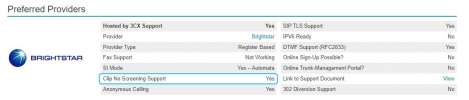
Brightstar does support Clip No Screening so it should be okay from the provider's end:
1640000562333.png

• If they do you should then check if the Outbound Parameters of the provider's SIP Trunk are set to use the OriginatorCallerID. Go to SIP Trunks, edit the SIP Trunk and go to Outbound Parameters. Check the "From: User Part" field, and "From: Display Name", what are they set to?
Have you checked these parameters?
 
Morning Chris,

I confirm: -

"From: User Part" is set to "OutboundCallerID"
"From: Display Name" is set also set to "OriginatorCalledID"

In order to achieve the end result, what do I need to set the above to? There are many options.

Thanks

Shobosh
 
Same issue, but Johns_3CX still seemed to have reservations about being able to pass the original caller ID after the call went through a DR.

https://www.3cx.com/community/threads/caller-id-not-passed-through-to-external-mobile.78732/

There are other outbound parameters that can affect outbound caller ID, depending on your provider. Make note of the original settings, as changing these can cause all calls to fail.

In my case, to pass on the original caller ID, on any forwarded calls, I had to set Remote Party ID Calling Party : Display Name and Host Part,to "Originator Caller ID"
 
  • Like
Reactions: jed and Evolute IT
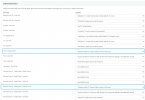
Brightstar has the following default parameters set:
1641300530504.png

As you can see, the OriginatorCallerID parameter is already being used (unless you've changed something or using an old template) in two fields. At this point I'd recommend, without changing anything, checking if 3CX is sending the correct information to the provider.

Simply, go to "Dashboard >> Activity Log >> Settings" and enable Verbose Logging. Replicate by making the same call and then go back to the activity Log. Check the log to see if the "From: Display Name" and "Remote Party ID - Calling Party: Display Name" fields are both carrying the Originator's CLI in the SIP INVITE sent to the SIP Provider. You can use the "Filter" button above to make looking through the logs easier by displaying only the last call, etc. If the values are correct but it still doesn't work, you might need to contact the SIP Provider.

Note: As a quick test you could also briefly set the "From: User Part" and the "Remote Part ID - Calling Party: User Part" to use the "OriginatorCallerID" and give it another go. You should revert these changes should you face any issues though.
 
Status
Not open for further replies.

Forum statistics

Threads
111,974
Messages
590,083
Members
164,901
Latest member
Silent_Guru