Password not working nor password reset

Status
Not open for further replies.

Alayyoubi

Bronze Partner
Joined
Jul 28, 2021
Messages
24
Reaction score
5
Hi Everyone,

We have a hosted instance of 3cx on Amazon Lightsail, the admin account was created using the customer email. Few weeks ago I changed the admin extension (100) from the customer name to admin, after make this change and not able to login to the admin portal using the email and password I always used to login. However, when I change the username from the email address to 100 is works find and lets me login.

The issue is I'm not able to change the password under the root credentials all fields are grayed out. and shows the username as admin and the email of the customer. Wehn I try to click on "forgot password" nothing come to the email to change the password.

How do I change gain access to the admin portal using the email address or the admin username? Please help!

Thanks,
Ahmed Alayyoubi
 
We have a hosted instance of 3cx on Amazon Lightsail, the admin account was created using the customer email. Few weeks ago I changed the admin extension (100) from the customer name to admin, after make this change and not able to login to the admin portal using the email and password I always used to login. However, when I change the username from the email address to 100 is works find and lets me login.
This is a separate issue to the problem you mention below. The Root Admin is not an extension, and 100 is just a user with whatever rights you happened to assign to them (usually assigned as the System Owner by default).

The issue is I'm not able to change the password under the root credentials all fields are grayed out. and shows the username as admin and the email of the customer. Wehn I try to click on "forgot password" nothing come to the email to change the password.
You can only change these credentials if you are logged in as the root admin.
If the forgot password and the system does not send you an email to the address you see there, it is possible that we have blocked that address due to abuse or maybe it was sent but ended up in spam or blocked after it left 3CX.

You can try using a different address and saving, then clicking again to resend the password to the new email address.
 
This is a separate issue to the problem you mention below. The Root Admin is not an extension, and 100 is just a user with whatever rights you happened to assign to them (usually assigned as the System Owner by default).


You can only change these credentials if you are logged in as the root admin.
If the forgot password and the system does not send you an email to the address you see there, it is possible that we have blocked that address due to abuse or maybe it was sent but ended up in spam or blocked after it left 3CX.

You can try using a different address and saving, then clicking again to resend the password to the new email address.
That worked, it was the admin email blocked by 3CX. Is there a reason for this and how do we whitelist an email if it is blocked in the future?
 
Usually our mailer will block you if you send an email to an address that has not yet been created, or if the email bounces back as undelivered.

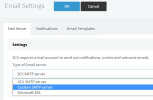
Normally you should not have a problem, but on dedicated Pro / Enterprise of course you can bypass our SMTP and define your own which you have control over:

1680767066540.png
 
  • Like
Reactions: Alayyoubi
In my experience, 3cx email banning is a little... overenthusiastic.

I've had more than one occasion when our email server went down and when it came back up again we could no longer receive voicemail emails from a very busy extension for several days due to the bounce / ban that occurred while it was offline.

This meant that the voicemails were lost as they were "Send and delete".
 
Status
Not open for further replies.

Forum statistics

Threads
111,974
Messages
590,081
Members
164,899
Latest member
mazet