Solved Patton 4114 FXS Ringing Issue

Status
Not open for further replies.

Roder

Customer
Joined
Sep 22, 2020
Messages
12
Reaction score
1
Have 3CX hosted on-premise and we are using the 4114 to break out several fax lines across our corp. SIP provider is Skyetel and T.38 support is enabled.

Followed the 3CX setup procedure and the 4114 is registered, showing my extensions online.

Calls to the extension trigger
Endpoint: IF_FXS_00
-------------------

Subscriber-Address: 3333
State: RINGING
Call Routing Destination: router (IF_FXS_00-precall-service)
on the FXS interfaces, however the fax machine itself is oblivious to this.

Attempting to dial out the fax machine detects dial tone and attempts to dial, but silence follows. The FXS doesn't appear to recognize any calls are being made.

Hoping someone may have faced a similar issue. Can provide any logs or configurations that may be helpful, just don't want to paste a wall of text that is irrelevant in the first post. I would be infinitely grateful for any nudges in the right direction!
 
Have you substituted an analogue phone, for the fax machine, to test incoming and outgoing calls? Check the 3CX Activity Log to be certain that the Patton is passing the outgoing call onto 3CX.
 
  • Like
Reactions: JohnS_3CX
Yes, same issue appears with an analog phone.

As I said, although there is a dial tone present, nothing occurs after dial. 3CX does not appear to ever receive the call.
 
If 3CX does not receive the Invite, yet the ATA is registered (it is, isn't it?), then there may be an internal dialplan, that is preventing the call from proceeding. You might try a full, factory reset, of the Patton, then a re-provision.
 
I've factory reset and reprovisioned several times.

It's like something inside the 4114 just isn't making the connection. The FXS extensions register with 3CX and the status pages of the extensions show ringing state when called.

Inbound calls wind up ending like this
09/22/2020 11:47:00 AM - [CM503003]: Call(C:30): Call to <sip:[email protected]:5060> has failed; Cause: 487 Request Terminated/INVITE from 172.16.5.2:5060
which I understand is basically just the calling party hanging up.
 
Are the server and Patton, on the same network, you said it was hosted "on-premise" ? The IPs shown would seem indicate that they are not, which may very well be the issue.
 
It is hosted on-premise, we have multiple sites connected with a site-to-site VPN.
 
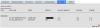
Here is the interaction between the Patton 4114 and 3CX. No other traffic seen between them during an attempted call.

voip.png
 
It would appear that the CANCEL, is coming from 10.254.0.63. Is that the IP of 3CX?
 
Yes the CANCEL is just me hanging up. PBX sends the disconnect signal basically.

3CX is definitely talking to the device, just need to figure out why it's not passing the calls to the physical ports and vice versa.
 
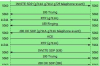
Here is the SIP interface Active Calls display when I dial:

called.png
 
The Patton is sending back a 180 RINGING, which would seem to indicate that it understood the Invite and is in fact ringing the set. If you pick up the phone, to answer, can you, even if it is not actually ringing?

I assume that each line, on the Patton, is assigned a unique port.

The 4114 comes in a few "flavours". All FXO, all FXS, and a combination. Is yours all FXS ports
 
All FXS. Nothing happens when the phone is picked up, just a dial tone.
 
Are there other SIP devices, on your network successfully using the 172.16.XX.XX IP range? Have you tried provisioning the Patton on the same subnet as the 3CX Server, 10.254.XX.XX , as a test?

You're not plugging the fax machine/ telephone into the wrong jack, by chance?
 
Yes I have multiple Yealink devices functioning normally in the 172.16.x.x range. They are able to auto-provision and all that good stuff, no issues there.

The 10.254.x.x range lives in a cloud environment behind a vMX100. Meraki site-to-site serves as the transport between all sites.

I thought I read somewhere there could potentially be an issue with the SIP packets and the PBX either delivering or not receiving the right IP address in the header when using FXS on different subnets, but for the life of me I can't find the post I read. Also the packet captures look right, so I'm not sure the issue here is IP related (although I'm not confident enough to rule that out).
 
After the last factory reset the unit is only negotiating 10Mb/s half-duplex. I think it may be faulty, going to warranty and try again when the new unit comes in. Appreciate the attempts to assist, will update when new unit is in.
 
After the last factory reset the unit is only negotiating 10Mb/s half-duplex.

I would be keen to hear the result of this - I have been using Patton gateways 10 + years and have never experienced a faulty unit - they are very well made.

I would look at post #15 on this string here: https://www.3cx.com/community/threads/patton-4114-config-issue.29770/ this is most likely the issue - also ensure the gateway is on the latest firmware and re-provisioned via 3CX on the latest template. https://www.patton.com/support/upgrades/

If all this checks out with the Patton and you want to continue troubleshooting this issue I would suggest alongside Wireshark running the CLI interface troubleshooting from the unit - it is very detailed.

For FXS/FAX it should be:

enable
debug call‐router
debug call‐control
debug fxs
debug ccfxs
debug media-gateway fax-data
debug media-gateway control
debug context sip‐gateway signaling detail 5
debug context sip‐gateway transport detail 5
debug context sip‐gateway error


Replicate the issue/capture and then use the command "no debug" all to cease the trace. I can help diagnose this if you want to send me a .txt output and matching Wireshark from 3CX: https://www.3cx.com/docs/capture-network-traffic/

The debug process looks something like this (although this is done on a Trinity based unit and the commands will differ a little):

This is the command set for both Trinity and Smartware variants (you have a Smartware device):
https://support.patton.com/index.ph...ebugging--smartware-vs-trinity-debug-commands
 
So the 10M/Half-Duplex issue was the device being put into RedBoot mode. That was user error holding the factory reset longer than 5 seconds! :oops:

I've attached the debug output per your instructions, any user specific information (phone number, name, public FQDN) is redacted.

My current firmware is R6.11.2019-07-02 which is most up to date to my knowledge.
 

Attachments

So the 10M/Half-Duplex issue was the device being put into RedBoot mode

This is very easily done, so if as you have said "I've factory reset and reprovisioned several times." I can see how this could of occurred (since based on different timings with the factory default button you can get different results).

In regards to your trace your Patton trace gets up to the point of the 180 Ringing (prior to any RTP being sent in a standard call) which in FAX is the point where it can usually convert to t38 tones:

1601303289765.png

Note: The above is an example taken from a call with T38 and G711 pass-through as failback.

We dont see any t38 in the trace, so this (since it was taken from the Patton side on an outbound attempt) could be either a setting on the PBX or the provider response. If you want to try again running Wireshark on the PBX server feel free to PM it across (for security reasons obviously).
 
Tore it all down and started fresh as we aren't in production yet, works now.

Going to accept the resolution and stop tearing my hair out. Appreciate the assistance guys!
 
  • Like
Reactions: eddv123
Status
Not open for further replies.

Forum statistics

Threads
112,322
Messages
591,889
Members
165,470
Latest member
Robert Lee