PATTON SmartNode Multiport FXO VoIP GW, 24 FXO ports SN4324/JO/UI

Status
Not open for further replies.

Song

Bronze Partner
Basic Certified
Joined
Nov 12, 2018
Messages
379
Reaction score
24
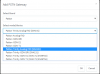
Can someone point me to the right direction on getting this setup? I recently purchased this on Patton website and they says they are compitable with the 3cx. I went into Sip trunk and Add Gateway, and choose Patton. But I do not see the Patton SmartNode FXO SN4324 on there. My question is have anyone install this before ? If so which option do you choose?
Attached is the only option i can choose.

thank you
 

Attachments

  • gateway.png
    gateway.png
    15.5 KB · Views: 6
Compatible and supportedis two different things. It is absolutely compatible but there is no template for it. You'll need to get a template from Patton or manually configure. @eddv123 maybe be able to help. For future reference here are the gateways 3CX supports: https://www.3cx.com/voip-gateways/

Also, it's almost always better/cheaper to go PRI or SIP than to have that many analog lines.
 
@cobaltit thanks for the tag.

Also, it's almost always better/cheaper to go PRI or SIP than to have that many analogue lines.

I would agree 100% however I do recall having these requested before for a client in China (although we have clients there already on SIP) apparently due to local regulations it was easier to stick with a bunch of FXO lines than move over to SIP.

@Song
If you want a template for this it would be a custom build, so either contact Patton for a template or it wouldn't take me long to write you one up based on an earlier smartware "supported" version.

Despite it being custom in this case it would work perfectly well however.
 
As a first step you want to select "Patton Analog FXO" as the gateway - you need the Smartware software supported gateway (not Trinity).

Complete as per: https://www.3cx.com/voip-gateways/patton-smartnode-sn4112/

On number of lines you can either do the following.

* Set as 24 and generate to see if the template provides with this many lines configured - if it does great! You can PM over for clarification.

* Add a lower value (although not stated on the guide, the supported value for FXO Pattons was 8) and then manually add the additional interfaces etc you need template experience for this.

I have not used the auto template generator from Patton to be honest, so whether you would get immediate success without alteration I cannot answer.

Let me know if you have any other existing questions.
 
Eddv123. Thank you for your help. I contacted Patton and they says its supported before I purchase this device. They told me to go here for the configuration. Is this all I need ?
http://wizard.patton.com/index.html...400|SN4900|SN4112|SN4114|SN4116|SN4118|SN4520

On the gateway option in 3cx. which option should I choose though?
Yes it is supported by Patton, not 3CX which means Patton would be the ones to help. But it looks like that generates a config you load into the Patton and then you create a generic trunk in 3CX. Patton will be able to clarify.
 
generates a config you load into the Patton and then you create a generic trunk in 3CX.

@cobaltit is right I think also. Hence my point here:

I have not used the auto template generator from Patton to be honest, so whether you would get immediate success without alteration I cannot answer.

I personally have not used the generator, but have seen a template before and it is pretty generic and would require alterations - generating from 3CX is the best way to do this in my opinion.
 
I finally got it working by doing the following: in 3cx I just added a gateway using the Patton Analog FXO. then I select 4 analog port and save it and use that configuration to upload to the Patton device. This configuration worked. The next thing I did was modify the working configuration to have more Analog port. So I go over the configuration and added up to 18 more ports everywhere in the configuration and reload it and it worked!!. The Patton wizard configuration did not work because it was complaining about some password not encrypted and it didn't dump in all the correct configuration into it. So the only thing that worked again is to use the default 3cx Patton Analog FXO configuration with 4 ports and modify it to your liking.

thank you all!!
 
Nice.. thanks for posting the resolution
 
Status
Not open for further replies.

Latest Posts

Forum statistics

Threads
111,939
Messages
589,843
Members
164,822
Latest member
Lengo