Solved Phone Configuration

Status
Not open for further replies.

Phil OE

Premier Customer
Joined
Nov 28, 2018
Messages
110
Reaction score
9
Our CEO wants all internal calls to come to him but he wants all external calls to go directly to his Assistant. I am not seeing an option or way to do this Also there is no way to add extensions on two different phones when one is claimed by another extension correct. For example add his extension to line 2 of the Assistant phone.
 
How are callers reaching him now? Just route all external calls to the assistant and let them transfer as needed.
 
All calls are going to him no matter what.
 
Why are all calls going to him? How are you inbound rules setup? Are you using ring groups or IVR menus?
 
IVR is setup if you type his extension it goes to him.
 
And that's the part he doesn't like?
 
Yes he is ok with Internal calls he just wants all external to go to his assistant.
 
So configure your inbound rules to route calls directly to the assistant.
 
So do I choose DID rule or CID rule to configure that correctly? I dont have a DID assigned to him in the IVR, my IVR is set off extension number
 
So if II understand correctly, the only problem here is that all Inbound Rules go to Digital Receptionist(s), and you don't want external callers to "Direct Dial" the Extensio of the CEO, right?

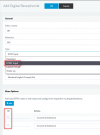
If this is the case, just change the Digital Receptionist type from 'Standard' to 'DTMF Input', then add the values below and where each one should route to:
1632309792098.png

In 'DTMF Input' type Digital Receptionists, the direct dial function does not work, so nobody dialing externally will be able to do direct dial.
 
Well, Standard you know the options you get direct dialing and single digits 0-9.
With DTMF Input, you can put specific values that should be accepted, those can be single digits like in my screenshot, or you can can have large values, e.g. "ID '126' should transfer calls to Extension 100".

Just to make it clearer, whatever value you put in the "ID" column, that is the expected DTMF digits that the user needs to input to choose that routing option.
 
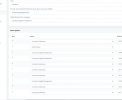
1632316262022.pngMy only concern changing all this would change our recordings we already have setup.I wish this was just as easy as setting a spot to separate Internal and external calls for timeout.
 
OK, here's an idea.
Leave the "Standard" Digital Receptionist as it is.
Then create a new Digital Receptionist of type "DTMF Input".
You should be able to select the same prompt you have already uploaded.
Set everything up as you want, test it by calling it from an internal extension.
Once you have it set up as you want, just switch all your Inbound Rules to point to the new "DTMF Input" Digital Receptionist you made.
 
OK, here's an idea.
Leave the "Standard" Digital Receptionist as it is.
Then create a new Digital Receptionist of type "DTMF Input".
You should be able to select the same prompt you have already uploaded.
Set everything up as you want, test it by calling it from an internal extension.
Once you have it set up as you want, just switch all your Inbound Rules to point to the new "DTMF Input" Digital Receptionist you made.
CFO does not want to disable extension calling for all just CEO. I am exploring other avenues to get this fixed and working they want it.
 
[0-9]{3} is the setting
 
We solved this by adding another extension. Making his ext DND forwarding internal calls to his new extension and then forwarding external to the assistant.
 
We solved this by adding another extension. Making his ext DND forwarding internal calls to his new extension and then forwarding external to the assistant.
Clever
 
Status
Not open for further replies.

Forum statistics

Threads
111,832
Messages
589,284
Members
164,662
Latest member
DejanMDS