Phone provisioning - BLF fields missing [RESOLVED]

Status
Not open for further replies.

cpontus

Joined
Feb 17, 2012
Messages
42
Reaction score
0
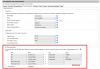
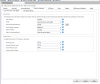
I am trying to configure sidecar BLF fields but they are missing. When I go to the extension and then the Phone Provisioning tab I can select the phone but the area under Codec Priority is empty. In the past I have had a BLF field list to assign extensions to. I have Yealink and Cisco phones with sidecars and neither show me the BLF assignment options.

Ideas? 3CX v12 SP4
 

Attachments

  • blf.png
    blf.png
    91.8 KB · Views: 1,660
Re: Phone provisioning - BLF fields missing

Are you saying the area with the red box is not appearing for some extensions?
Or are you needing more BLF's - if so - hit the more button.
 
Re: Phone provisioning - BLF fields missing

What's in the red box is not there -- it's just blank after the codec section.
 

Attachments

  • noblf.png
    noblf.png
    40.4 KB · Views: 1,617
Re: Phone provisioning - BLF fields missing

I know for a sure you cannot program add on side cars with the 3CX provisioning tab.. Example: T46G with Add on Side car from Yealink
 
Re: Phone provisioning - BLF fields missing

Maybe someone from 3CX could chime in on this -- has the functionality been removed? I think when it was there before I just chose the template with the sidecar and they showed up.
 
Re: Phone provisioning - BLF fields missing

Just a stab - are the fields in the template?
Maybe if the template does not reflect the blfs then they do not show up... I see them fine with my yealink and grandstream phones...
 
Re: Phone provisioning - BLF fields missing

It looks to me like several possibilities:

1. Your last example shows an incomplete MAC for the phone/entry in question. I am not sure if you hid part of it for security or if this may be a part of the issue. I always get an error from 3CX if the MAC entry is not complete or filled out incorrectly.

2. The application is corrupt and somehow able to function, but is not displaying this aspect of the screen. Even when just adding an extension and prior to providing any details surrounding the phone to be assigned to the extension, the screen shows the available fields for BLF. Is your example consistent for any/all extension and/or extensions to be added? If so, perhaps a backup, uninstall and reinstall of the application followed by a restore is in order.

3. If the screen shot was taken from a browser, perhaps the browser is at fault. Try a different one and see.

4. I have never played with the free version. Is it possible that this is a free version or perhaps a paid version that has reverted to free? The free version may come with complete functionality, but as I indicated I have not played with it yet know that some of the functionality Is handicapped.
 
Re: Phone provisioning - BLF fields missing

Hi CP,

Are you using the standard or Pro version? The free version will not allow you configure BLF's ( the BLF section will be missing).
 
Re: Phone provisioning - BLF fields missing

roland.s said:
Hi CP,

Are you using the standard or Pro version? The free version will not allow you configure BLF's ( the BLF section will be missing).

Jackpot!!! This was the problem. Re-entered my key, restarted services and I'm back in business.

I have read on here that a MAC address change can cause a license reset -- I did remove an unused (no wire attached) USB ethernet adapter recently.

To the other posters, thanks for the responses. I edited out the MAC address and all the templates were correct.
 
Status
Not open for further replies.

Members Online Now

Forum statistics

Threads
111,835
Messages
589,288
Members
164,665
Latest member
dominik.pepel