• We do not provide troubleshooting help for unsupported phones. Please try with a supported phone.
  • V20 Update 10 Alpha 2 Learn more

Polycom VVX411 Losing it's Server Credentials

Status
Not open for further replies.

PatrickMcLeanCI

Free User
Advanced Certified
Joined
Sep 7, 2021
Messages
27
Reaction score
3
I have several VVX411's deployed across several locations but I have 2 in particular in one location that seem to be losing their server ID and password credentials overnight. The provisioning server details stay in, but I'll get a call in the morning that the phones are offline and when I check they have a blank username and password field. After putting the credentials back in and rebooting they come up fine and stay working all day.
 
  • 3CX Version, Professional Annual 16.0.8.9
  • Server OS, Windows 10 Professional
  • Is the 3CX Server Hosted and where? Local
  • IP Phone Make/Model/Firmware version, Polycom VVX411 version 6.3.0.14929
  • Provisioning Method: VPN
  • Trunk Provider or VoIP Gateway Make/Model, Cloudli SIP Trunk
  • Has the Firewall Checker passed: YES
  • Are custom Phone Templates being used: NO
I just included the VVX411 but I'm having issues with the other phones onsite too (IP335s).

One other thing I learned is that my other VVX411's (at a different physical location and network) lose the credentials too (what I mean by this is the Server User and Server Password fields go blank) but they remain provisioned to the system. The ones at my trouble location need their credentials put back in before they will provision back to my 3cx.
 
Since you are using a VPN to connect the phones site to the PBX site (which I imagine are at different locations), what method did you use to get the provisioning loaded on the phones?


- So for example did you enter the 3CX provisioning URL in the phone, and it downloaded the config from 3CX?
- Or did you use DHCP Option 66 to feed the URL to the devices?
- Or did you manually type in the user/pass/server/port etc into each phone's UI?
- Or other (describe please)?
 
Manually entered the URL in the phone, along with Server User and Server Password to authenticate.
 
Can you please share a screenshot of where exactly the URL is pasted?

Just replace any random characters or domain names with XXXXXX if for privacy in the screenshot
 
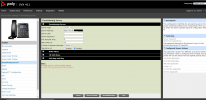
vvx411 provision.png

This specific phone is currently provisioned and working. But it will stop working in the morning and I have to put the credentials back in and reboot to make it work again. Only phones at one specific location are doing this even though I have a 2nd location set up the exact same way (just a different network).
 
Ok, first let's confirm that 3CX is configuring the device properly. From a PC connected on the exact same network as the Polycom (ie. a laptop hooked up to the spare ethernet PC port on the back of the phone) try to download the config file by building the config link in the following format:

http://192.168.x.x:5000/provisioning/{random_folder_name }/{mac_address_of_that_phone}-config.cfg

This should download a .cfg file on your PC which when opened in a text editor will show you whether 3CX is sending the correct details to the phone.

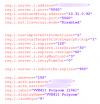
1634221625297.png
 
I grabbed it from the UI itself. All the settings are correct, but it doesn't display auth.password
 
Hi Patrick,

I just re-read our entire conversation

1634223958288.png

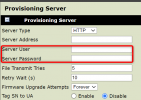
Is this what you meant was being lost?
 
Hi Patrick,

I just re-read our entire conversation

View attachment 25158

Is this what you meant was being lost?
Yes and I've realized now that it doesn't really matter that its lost, as I have several phones that still function day to day with that information disappearing.

But I'm still having a specific issue where some phones aren't working in the morning and the only way to make them work is to re-enter those credentials and reboot those phones.
 
OK this conversation makes a lot more sense to me now :)

Those fields are entirely unnecessary for local provisioning, they are not used by the phone or 3CX.

So whether they are lost or kept is entirely irrelevant. You can type anything you want there, it will not make any difference at all to the phone's provisioning.


As for the specific phones having the issue, I think simply the fact of rebooting them is what makes the difference (since the Polycom phone reprovisions at startup, but it also restarts the OS, the network, the SIP engine etc).

Hence, what happens to those phones exactly when you say they stopped working, because this could mean a number of things such as:

- The network is down and a reboot brings it back up
- A DHCP conflict occurs and they lose access to the network
- The phone freezes due to power issues or hardware failure
- Any other 3rd factor we haven't yet discussed
 
Ahhh ok that makes sense. So username/password is really only required for Direct SIP or external provisioning (maybe with an SBC?). Otherwise I just have to put the provisioning server in and phones will just provision? Because I've been manually provisioning some old Talkswitch phones and they only configure when I put in all those credentials.
 
Last edited:
Ahhh ok that makes sense. So username/password is really only required for Direct SIP or external provisioning (maybe with an SBC?).
No it is not required. We don't have a username and password for provisioning

Otherwise I just have to put the provisioning server in and phones will just provision?
Exactly, this is all you need.

Because I've been manually provisioning some old Talkswitch phones and they only configure when I put in all those credentials.
Hmmm.. I think what you were typing into those phones was probably the SIP credentials
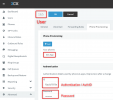
1634280614698.png

Whereas what you see here are HTTP credentials, something entirely unrelated.
3CX does not make use of the below. The only thing you enter here is a URL and Server type
1634223958288-png.25158


Also as per our guide: https://www.3cx.com/sip-phones/polycom-vvx/#h.3hiifqrpse89
1634281073714.png

So I'm not really sure why you were entering a user/pass here in the first place :)
 
No it is not required. We don't have a username and password for provisioning


Exactly, this is all you need.


Hmmm.. I think what you were typing into those phones was probably the SIP credentials
View attachment 25170

Whereas what you see here are HTTP credentials, something entirely unrelated.
3CX does not make use of the below. The only thing you enter here is a URL and Server type
1634223958288-png.25158


Also as per our guide: https://www.3cx.com/sip-phones/polycom-vvx/#h.3hiifqrpse89
View attachment 25171

So I'm not really sure why you were entering a user/pass here in the first place :)
So just an update, I've got these phones set up now without those username/password entered, and they still work all day but then I need to reboot these phones every morning to get them to work. I'm not sure why I have to do it with these specific phones and not any other VVX411s?
 
Hi Patrick,

What do you mean exactly by "they are not working"?
 
The phones stay provisioned all day but in the morning I have to reboot them to get them to reprovision.

I don't have to do this with any other location's VVX411's.
 
I mean what exactly is the problem (provisioning aside)
For example:

  • Do they freeze?
  • Do they stop making calls?
  • Do they stop receiving calls?
  • Do they show some message on the screen?
 
They show URL disabled, and do not show up in the phone device list on 3CX.
 
So the devices appear to lose registration. Check:

- The Windows 10 server time must be correct! (if using hyper-v you might have time drift)
- The phones time must be correct!
- The network may be going down at some point during the night
- The NTP might be problematic

So you mostly have to do time and network troubleshooting to find out what happens.

Perhaps setup a ping script towards the phones with timestamps, and see when they stop responding?
Have you tried connecting them to a different network location (other switch, other cable)?

Read what I said on this post
 
Status
Not open for further replies.

Forum statistics

Threads
112,149
Messages
590,965
Members
165,171
Latest member
Mahlon