Post O365 Integration - User's softphone "flashing" when queue call comes in. Unable to answer

Status
Not open for further replies.

PremierOne

Forum User
Joined
Jun 24, 2020
Messages
9
Reaction score
1
We recently implemented the 3CX / O365 migration and have User Sync & Sign In enabled. We turned it on during the day and everything seemed fine. The following morning a weird issue popped up where my four openers were unable to grab calls. They were logged into the queue, but their softphones would just "flash" but never ring. Once I added them to the exclusion list for User Sync & Sign In, their phones were able to answer calls. What is causing this? Is it because they have scheduled appointments on their calendars and it saw them as "busy?" I don't have any other theories but wondered what was causing this. Let me know if you need more information or if you have any ideas. Thank you!
 
If you have the calendar to sync status enabled and they were marked busy that would cause them to not get calls. Did you notice the presence state in 3CX?

You can exclude them from the calendar to sync status if you want everyone else to keep using it or turn it off but leave sync & sign in.
 
  • Like
Reactions: NickD_3CX
If you have the calendar to sync status enabled and they were marked busy that would cause them to not get calls. Did you notice the presence state in 3CX?

You can exclude them from the calendar to sync status if you want everyone else to keep using it or turn it off but leave sync & sign in.
Thank you for responding. Calendar to Status Sync is currently disabled.
 
I don't see then how else the O365 Sync could affect whether an extension rings or not.
I assume first of all that the users are using the 3CX Clients, not some other client like Teams, correct?

If this is the case, you need to enable Verbose logging from Dashboard --> Activity Log --> Settings.
Then replicate the issue again, and once you have, check the Activity Log for clues as to why this is happening.
 
I don't see then how else the O365 Sync could affect whether an extension rings or not.
I assume first of all that the users are using the 3CX Clients, not some other client like Teams, correct?

If this is the case, you need to enable Verbose logging from Dashboard --> Activity Log --> Settings.
Then replicate the issue again, and once you have, check the Activity Log for clues as to why this is happening.

Thank you, Nick. We are using the 3CX clients, but do have the Teams integration enabled. I will enable the verbose logging for sure. Thank you.
 
Thank you, Nick. We are using the 3CX clients, but do have the Teams integration enabled. I will enable the verbose logging for sure. Thank you.
Great, so that, but I'd recommend shutting down the Teams client when doing this test to get "cleaner" results in the logs.
 
Great, so that, but I'd recommend shutting down the Teams client when doing this test to get "cleaner" results in the logs.
Will do. Testing Monday morning and will update here. Thank you, Nick.
 
Great, so that, but I'd recommend shutting down the Teams client when doing this test to get "cleaner" results in the logs.
Tested again with Teams client shut down and still did the same thing.
 
If this is the case, you need to enable Verbose logging from Dashboard --> Activity Log --> Settings.
Then replicate the issue again, and once you have, check the Activity Log for clues as to why this is happening.
@PremierOne Did you do this to check for clues as t why this is happening?
 
@NickD_3CX we're having very similar issues.. which seem to coincide with enabling direct routing... only seems to affect call queues.. calling direct extensions doesn't yield the same results
 
@NickD_3CX we're having very similar issues.. which seem to coincide with enabling direct routing... only seems to affect call queues.. calling direct extensions doesn't yield the same results
The users that are reporting this, if you call them directly, can they answer from the Teams Client? Not from the 3CX app.
 
@NickD_3CX
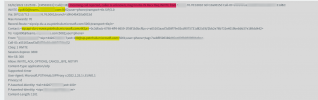
below is a screengrab of one of the errors... it's saying call rejected caller unknown?
1644499965681.png

if i close down my teams and call the queue on it's extension using 3cx webclient i also see a number of these:
1644500222341.png
 
The users that are reporting this, if you call them directly, can they answer from the Teams Client? Not from the 3CX app.
the users reporting are not using the teams client. if i add users who ARE using the teams client to the queue they seem to be able to answer the calls.
 
the users reporting are not using the teams client. if i add users who ARE using the teams client to the queue they seem to be able to answer the calls.
You seem to be having a slightly different issue than the OP, so I think you need to open a new thread so as not to get confused here.

The INVITE message with the caller unknown is an incoming request FROM teams, to 3CX. the Agents not ringing though has something to do with 3CX SENDING to the client.

Anyway, open a new thread in this category, write the exact problem you are having with a description so we have a clear picture of what is happening and we can take it from there.
 
  • Like
Reactions: CFP
Is this problem solved? We've the same problem?
 
Is this problem solved? We've the same problem?
Because there are 2 slightly different problems described in this thread, could you please state exactly the symptoms you are seeing?
 
We're seeing similar issue on client after they were updated to O365 E5 licenses. You can call extension directly, but agents are unable to pick up inbound calls.
 
We're seeing similar issue on client after they were updated to O365 E5 licenses. You can call extension directly, but agents are unable to pick up inbound calls.
If the users you have synced with 3CX and that you upgraded them to an E5 license (which includes "Phone System") exhibits this, but they have not been configured to use the Teams Integration, you need to remove the "Phone System" attribute from their E5 license, like explained here:
https://www.3cx.com/community/threads/remove-a-user-from-teams-integration.88581/post-520263
 
Status
Not open for further replies.