pr. dialer

Status
Not open for further replies.

YCall

Trainee Partner
Joined
Dec 31, 2022
Messages
44
Reaction score
1
Hello everyone:)
We made a small application of predictive dialing, but why "make call" calls only one line, and the second line of make call is not created. That is, there is always one line, how to fix it? In power dialer you can configure this in CFD constructor, but not in the predictive dialer.
Would you recommend anything?

(sorry for my english)
 
Are you following this guide? Are you using a database to get the numbers? You need to ensure that your SQL query filters the numbers that you already called.
 
Are you following this guide? Are you using a database to get the numbers? You need to ensure that your SQL query filters the numbers that you already called.
yes we do everything with txt file numberstocall. I'm saying that "make call" makes only 1 call at the same time, it does not make the second one at the same time. In the constructor, you can set up simultaneous lines only in the power dialer, but how can you do it in the predictive dialer? Automatically it only uses 1 line.
 
In the predictive dialer mode, the CFD app will monitor the call queue that you specify, and it will make calls according to the number of agents available. However, at the beginning it might take a while to reach the number of calls required for all the free agents. This is because the Make Call component will wait the timeout that you specify for a result, then if the call can't be established, the dialer might get delayed for X seconds. If you're not using the Result property of the Make Call component to tell if the call was established or not, then you should decrease the timeout to 1 second, so it moves faster to the next call.
 
  • Like
Reactions: Evolute IT
In the predictive dialer mode, the CFD app will monitor the call queue that you specify, and it will make calls according to the number of agents available. However, at the beginning it might take a while to reach the number of calls required for all the free agents. This is because the Make Call component will wait the timeout that you specify for a result, then if the call can't be established, the dialer might get delayed for X seconds. If you're not using the Result property of the Make Call component to tell if the call was established or not, then you should decrease the timeout to 1 second, so it moves faster to the next call.
Do you mean that he needs time to understand that he needs to use more than one line, since he will understand later that the number of operators allows? It seems like there are 10 lines where operators are waiting for a call, but they come to line 1 and (or) line 2 (maximum), nothing came to the rest of the lines. Make call worked by itself in single line mode all time. We did not wait a long time (10 minutes), if you are right, it will be great, otherwise give me more advice, please. We will test for more than 10 minutes to check if something has changed or not.

And about the second: it needs to be changed to 1 sec on the screen, right?
 

Attachments

  • 3cx.png
    3cx.png
    36.4 KB · Views: 8
Yes, correct, setting that Timeout to 1 second will speed up the dialer. And if you give it enough time, it should make calls for all your agents.
 
Yes, correct, setting that Timeout to 1 second will speed up the dialer. And if you give it enough time, it should make calls for all your agents.
Fine. We will test on Monday, if everything is ok I will close the topic.
Thank you for your help.
 
  • Like
Reactions: edossantos
Building on this discussion of the predictive dialer. Is there any way to check if the call is in progress and after that update the database informing that the number should no longer be dialed.?

My dialer is predictive and consults the numbers in the database and after calling the number it transfers to another CFD.
 
Building on this discussion of the predictive dialer. Is there any way to check if the call is in progress and after that update the database informing that the number should no longer be dialed.?

My dialer is predictive and consults the numbers in the database and after calling the number it transfers to another CFD.
You can use the Result property of the MakeCall component to then update your database with a second query. Just make sure that your initial select query contains a WHERE to filter out dialed numbers.

Another way is to do the MakeCall to a CFD which then forwards to the queue. This way, you can use the CFD to do the database update and make sure the call was actually answered by someone by asking them to press 1 or something like that before sending them to the queue.
 
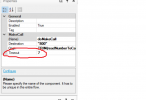
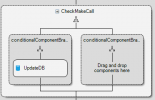
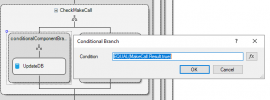
Basically I did what is in the image, but the makecall always returns false and does not update the database.

1690555267236.png

1690555316902.png
 
Basically I did what is in the image, but the makecall always returns false and does not update the database.

View attachment 36544

View attachment 36545
If your outbound rule reformats the number, the result will always be false. That's because the CFD monitors outbound calls to the number, but if it changes via a rule, then it won't find it and thus cannot monitor it.
 
I believe this is the problem, my dialer sends 5555+number, 5555 is to use a specific outbound rule and in the outbound rule I reformat the number by removing the 5555.

Is there any other way to get it done or just using the database update in another cfd?
 
I believe this is the problem, my dialer sends 5555+number, 5555 is to use a specific outgoing rule and in the outgoing rule I reformat the number by removing the 5555.

Is there any other way to get it done or just using the database update in another cfd?
Yeah just do the update in a second CFD before sending the call to the queue. It will work better.
 
Status
Not open for further replies.

Members Online Now

No members online now.

Forum statistics

Threads
111,831
Messages
589,277
Members
164,660
Latest member
RJenkinsROCK