Problem outbound calls from 3cx with SPA-3102

Status
Not open for further replies.

nightskater

Joined
Apr 8, 2011
Messages
8
Reaction score
0
Hi all,
a have a 3cx instaled with a SPA-3102, i receive inbound calls but the outbound calls doesn't seem to work.
I set the outbound rule to exit with 8 (the mobile number is 0745147724), when i ring an external number it shows connected but i hear the tone and my mobile phone doesn't ring. I've searched the forums but no solution. Please help!
This are the logs:

12:15:43.422 [CM503008]: Call(19): Call is terminated
12:15:41.628 [CM503007]: Call(19): Device joined: sip:[email protected]:5062
12:15:41.612 [CM503007]: Call(19): Device joined: sip:[email protected]:50389;rinstance=095ee93d8ca9f50c
12:15:41.612 [CM505002]: Gateway:[Linksys] Device info: Device Identified: [Man: Linksys;Mod: SPA Series;Rev: General] Capabilities:[reinvite, no-replaces, able-no-sdp, recvonly] UserAgent: [Linksys/SPA3102-3.3.6(GW)] PBX contact: [sip:[email protected]:5060]
12:15:41.612 [CM503002]: Call(19): Alerting sip:[email protected]:5062
12:15:41.550 [CM503025]: Call(19): Calling PSTNline:0745147724@(Ln.10000@Linksys)@[Dev:sip:[email protected]:5062]
12:15:41.503 [CM503004]: Call(19): Route 1: PSTNline:0745147724@(Ln.10000@Linksys)@[Dev:sip:[email protected]:5062]
12:15:41.503 [CM503010]: Making route(s) to <sip:[email protected]:5060>
12:15:41.503 [CM505001]: Ext.10: Device info: Device Not Identified: User Agent not matched; Capabilities:[reinvite, replaces, able-no-sdp, recvonly] UserAgent: [3CXPhone 5.0.14900.0] PBX contact: [sip:[email protected]:5060]
12:15:41.487 [CM503001]: Call(19): Incoming call from Ext.10 to <sip:[email protected]:5060>
12:15:28.680 [CM504001]: Ext.10: new contact is registered. Contact(s): [sip:[email protected]:50389;rinstance=095ee93d8ca9f50c/10]
 
It looks to that the phone system is adding an 8 to the number you dial at the beginning. is that the way you intended it to be set up?
 
I believe that "8" is his access digit, within 3CX, and it appears to be stripped before the call is send to the 3102.

nightskater said:
12:15:41.550 [CM503025]: Call(19): Calling PSTNline:0745147724@(Ln.10000@Linksys)@[Dev:sip:[email protected]:5062]

nightskater said:
when i ring an external number it shows connected but i hear the tone and my mobile phone doesn't ring.
.

Can you dial the mobile, with no problem, from a standard telephone, plugged into the same telephone socket? What tone are you getting? ringback? Busy? Call can't be completed?

In the 3102, if you go into admin/advanced, the the Voice tab, then Info tab, at the bottom , in the PSTN section, it will show the last PSTN number that you (the 3102) dialed, confirm that it is correct. Also confirm that the Hook State = On
 
Hi nightskater,
I have perhaps the same problem as you, whenever i dial out
Log files posted below....
12:03:07.390 [CM503008]: Call(27): Call is terminated
12:02:55.375 [CM503007]: Call(27): Device joined: sip:[email protected]:5062
12:02:55.359 [CM503007]: Call(27): Device joined: sip:[email protected]:5060
12:02:55.343 [CM505002]: Gateway:[Outside Line] Device info: Device Identified: [Man: Linksys;Mod: SPA Series;Rev: General] Capabilities:[reinvite, no-replaces, able-no-sdp, recvonly] UserAgent: [Linksys/SPA3102-5.1.10(GW)] PBX contact: [sip:[email protected]:5060]
12:02:55.343 [CM503002]: Call(27): Alerting sip:[email protected]:5062
12:02:55.281 [CM503025]: Call(27): Calling PSTNline:07544812265@(Ln.10000@Outside Line)@[Dev:sip:[email protected]:5062]
12:02:55.250 [CM503004]: Call(27): Route 1: PSTNline:07544812265@(Ln.10000@Outside Line)@[Dev:sip:[email protected]:5062]
12:02:55.234 [CM503010]: Making route(s) to <sip:[email protected]>
12:02:55.234 [CM505001]: Ext.555: Device info: Device Identified: [Man: Linksys;Mod: SPA Series;Rev: General] Capabilities:[reinvite, no-replaces, able-no-sdp, recvonly] UserAgent: [Linksys/PAP2T-5.1.6(LS)] PBX contact: [sip:[email protected]:5060]
12:02:55.234 [CM503001]: Call(27): Incoming call from Ext.555 to <sip:[email protected]>

Did you manage to fix this.. I cant see any posts that resolve the problem..
 
The log you posted doesn't indicate a problem. The number your extension dialled is the same number sent to the 3102.

Andy8912 said:
12:02:55.281 [CM503025]: Call(27): Calling PSTNline:07544812265@(Ln.10000@Outside Line)@[Dev:sip:[email protected]:5062]

Andy8912 said:
12:02:55.234 [CM503001]: Call(27): Incoming call from Ext.555 to <sip:07544812265@10.89.120.4>
 
leejor said:
The log you posted doesn't indicate a problem. The number your extension dialled is the same number sent to the 3102.

Andy8912 said:
12:02:55.281 [CM503025]: Call(27): Calling PSTNline:07544812265@(Ln.10000@Outside Line)@[Dev:sip:[email protected]:5062]

Andy8912 said:
12:02:55.234 [CM503001]: Call(27): Incoming call from Ext.555 to <sip:07544812265@10.89.120.4>

exactly the reason I asked nightskater if he resolved his problem, i cant see an issue with his log either. but we have the same issue with the same equipment, when i dial out, instead of being connected to the number dialed i recieve a message from my line provider i suspect its some missing/incorrect setting in the 3102
 
His post was different in that an 8 was being left on the outbound number, I suspect because he was using an 8 as an access digit and wasn't deleting one digit in his outbound rules. There is no change in the number in your case. Not the same issue. You are supposedly sending the 3102 correct digits, he wasn't. If you are having problems dialling out, and the number you are sending to the 3102 is correct (and you can confirm the sent number in the 3102 config pages), then there is something else at play in your case. It may be a setting in the 3102, it may be your phone line, or your provider.
 
jgruss said:
It looks to that the phone system is adding an 8 to the number you dial at the beginning. is that the way you intended it to be set up?

yep..8 is the digit that alows me to go out...i have an outbound rule and the first digit is striped, so the number that the pstn line calls is 0745147724
 
PSTN Line Status
Hook State: On
Line Voltage: -36 (V)
Loop Current: 0.0 (mA)
Registration State: Registered
Last Registration At: 1/1/2003 13:58:59
Next Registration In: 496 s
Last Called VoIP Number: 10000
Last Called PSTN Number: 0745147724
Last VoIP Caller:
Last PSTN Caller: , 0745147724
Last PSTN Disconnect Reason: VoIP Call Ended
PSTN Activity Timer: 30000 (ms)
VoIP State: Idle PSTN State: Idle

this is the status...so the pstn calls my mobile number
the problem is with a setting on the SPA 3102 because i have now a VOIP number and this alows me to make outbound calls.
To make calls with my voip number i use (7)..so when i dial 70745147724 ...it rings...
i called directy from the pstn line on the number and it rings.
So when i try with SPA 3102 it shows connected but i only hear a long tone...like i should start dial.

And this is the log:
16:12:03.174 [CM503008]: Call(39): Call is terminated
16:11:53.065 Currently active calls - 1: [39]
16:11:41.038 [CM503007]: Call(39): Device joined: sip:[email protected]:5062
16:11:41.038 [CM503007]: Call(39): Device joined: sip:[email protected]:61896;rinstance=9d581f92663e09b0
16:11:41.006 [CM505002]: Gateway:[Linksys] Device info: Device Identified: [Man: Linksys;Mod: SPA Series;Rev: General] Capabilities:[reinvite, no-replaces, able-no-sdp, recvonly] UserAgent: [Linksys/SPA3102-3.3.6(GW)] PBX contact: [sip:[email protected]:5060]
16:11:41.006 [CM503002]: Call(39): Alerting sip:[email protected]:5062
16:11:40.944 [CM503025]: Call(39): Calling PSTNline:0745147724@(Ln.10000@Linksys)@[Dev:sip:[email protected]:5062]
16:11:40.897 [CM503004]: Call(39): Route 1: PSTNline:0745147724@(Ln.10000@Linksys)@[Dev:sip:[email protected]:5062]
16:11:40.897 [CM503010]: Making route(s) to <sip:[email protected]:5060>
 
leejor said:
His post was different in that an 8 was being left on the outbound number, I suspect because he was using an 8 as an access digit and wasn't deleting one digit in his outbound rules. There is no change in the number in your case. Not the same issue. You are supposedly sending the 3102 correct digits, he wasn't. If you are having problems dialling out, and the number you are sending to the 3102 is correct (and you can confirm the sent number in the 3102 config pages), then there is something else at play in your case. It may be a setting in the 3102, it may be your phone line, or your provider.

I've tried without the 8 digit and sended the number like him ...and it is the same result...a long tone...here is the log

17:09:14.119 [CM503008]: Call(48): Call is terminated
17:09:09.907 [CM503007]: Call(48): Device joined: sip:[email protected]:5062
17:09:09.907 [CM503007]: Call(48): Device joined: sip:[email protected]:61896;rinstance=9d581f92663e09b0
17:09:09.892 [CM505002]: Gateway:[Linksys] Device info: Device Identified: [Man: Linksys;Mod: SPA Series;Rev: General] Capabilities:[reinvite, no-replaces, able-no-sdp, recvonly] UserAgent: [Linksys/SPA3102-3.3.6(GW)] PBX contact: [sip:[email protected]:5060]
17:09:09.892 [CM503002]: Call(48): Alerting sip:[email protected]:5062
17:09:09.814 [CM503025]: Call(48): Calling PSTNline:0745147724@(Ln.10000@Linksys)@[Dev:sip:[email protected]:5062]
17:09:09.767 [CM503004]: Call(48): Route 1: PSTNline:0745147724@(Ln.10000@Linksys)@[Dev:sip:[email protected]:5062]
17:09:09.767 [CM503010]: Making route(s) to <sip:[email protected]:5060>
17:09:09.767 [CM505001]: Ext.10: Device info: Device Not Identified: User Agent not matched; Capabilities:[reinvite, replaces, able-no-sdp, recvonly] UserAgent: [3CXPhone 5.0.14900.0] PBX contact: [sip:[email protected]:5060]
17:09:09.751 [CM503001]: Call(48): Incoming call from Ext.10 to <sip:[email protected]:5060>
 
If the tone you hear is dial tone, then what I have seen, in the past, is... setting the outgoing DTMF level too high in the 3102 can create a situation where the correct digits seem to be sent, but, dialtone is never "broken". It doesn't make sense, but I have had that happen a number of times and can reproduce it.
 
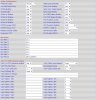
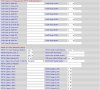
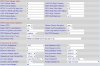
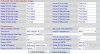
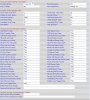
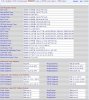
Hi! i posted the photos with the config of 3102..maybe u have any ideea that could go wrong...
 

Attachments

  • 1.jpg
    1.jpg
    132.5 KB · Views: 1,631
  • 2.jpg
    2.jpg
    143.7 KB · Views: 1,631
  • 3.jpg
    3.jpg
    140.3 KB · Views: 1,630
  • 4.jpg
    4.jpg
    115.5 KB · Views: 1,631
Could I recommend you doing a full factory reset of the SPA-3102 device, get 3CX to automatically provision it for you. Often or not, we get quite a few calls about SPA-3102 not working, and following this tip normally resolves all issues.

In the mean time, I have looked at your configurations and can only see two options that are set that do not match our installation.

Your first Image: PSTN Ring Thru Delay: (Yours 1.5) (Ours 1)
Your Last Image: Use OB Proxy in Dialog: (Yours No) (Ours Yes)

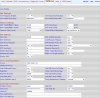
Could you post the Regional Settings Page?
 
Your first Image: PSTN Ring Thru Delay: (Yours 1.5) (Ours 1)
Your Last Image: Use OB Proxy in Dialog: (Yours No) (Ours Yes)

Done...no changes ! Here are the regional ( My location is Romania)
 

Attachments

  • 1.jpg
    1.jpg
    99.4 KB · Views: 1,624
  • 2.jpg
    2.jpg
    175.9 KB · Views: 1,625
  • 3.jpg
    3.jpg
    208.7 KB · Views: 1,625
When you setup the SPA-3102 did you do this manually or via 3CX auto provisioning?
 
3CX auto provisioning with small modifications..because it didn't work...
 
PSTN ring thru delay won't make any difference as you don't have PSTN ring thru line 1 set to yes. There is no outbound proxy datafilled (you are on the same LAN after all) so Use OB Proxy in dialog can just be left at No

Still looking over the other settings....

Given the mobile number you are calling, I'm assuming you are using the 3102 in the UK. There are a number of settings that should be changed for use in that area. The one affecting you might be the FXO port Impedance, under International control. Try using 370+620||310nF.
Here is a link to a document that was put together listing recommended settings for your area...http://www.provu.co.uk/pdf/sipura/sipura_uk_regional_settings.pdf
 
As i mentioned before my location is Romania....do you think uk settings will apply?
 
Sorry, missed your locations in previous post. I just went by the phone number.

The default options in the 3102 are for North America so you should do a search for someone that has posted settings that have been tested to work properly in Romania. The Impedance setting has caused grief in the past, when left at NA setting and used in Europe, especially echo problems.

If it were me...I would monitor the line with test set (that's' one that can monitor but doesn't cause an off-hook) and listen to see what is being sent out (the DTMF tones) on the line. Is it breaking dialtone, and then you reach something else, or is it never breaking dial tone, and then, why, low DTMF level?.

I'm assuming that you have DTMF service on the line. The 3102 doesn't do dial pulse.
 
Status
Not open for further replies.