Problem provisioning Snom D735

Status
Not open for further replies.

mfever377

Customer
Joined
Jul 24, 2019
Messages
27
Reaction score
4
I have a brand new Snom D735 which I just cannot seem to provision - but my circumstances are slightly different to a previous forum question about the same phone.

Environment:
  • Latest version of 3CX v16 installed on premises (Windows version)
  • Six other Snom 725 phones provisioned without a problem. When first connected to LAN, the 725 phones appeared in bold in the 'Phones' section, ready to be assigned.
  • Dedicated LAN and switch for the phone system.
  • D735 gets IP address on the LAN and can ping it and login to web interface.
  • D735 does not appear in 3CX management portal 'Phones' section.
  • D735 has been rebooted and hardware reset several times.
  • Have updated firmware on D735 using web interface of phone, downloading firmware directly from Snom
    https://service.snom.com/display/wiki/Firmware+Update+Center
  • 3CX has been rebooted several times.
  • Have tried adding MAC of phone directly to an extension, under Phone Provisioning, but without success.
Is this particular Snom model a problem?

Martin
 
I know this does not resolve the issue fully. What happens if you

Manually add the phone to 3CX under the provisioning tab of the extension
Copy the provisioning link
Enter the provisioning link into the phone, via the phone web portal.
 
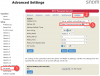
Thanks for the suggestion. I've just tried it by copying the configuration URL from the Phone Provisioning page and uploading it directly into the phone (see picture).


I clicked APPLY and then REBOOT, but it stills doesn't appear in 3CX.

[Edited by admin]
 
Last edited by a moderator:
Is the IP address of the phone blacklisted,

From the 3CX machine, can you ping the ip address of the phone.
 
Security > IP Blacklist doesn't list the IP address of the D735 phone.

Yes, the 3CX server (10.3.80.2) can ping the D735 phone (10.3.80.12), and it can login to the web interface of the phone.

Have checked this article, and network interface on 3CX server is configured for PnP. This is confirmed by the successful provisioning of the Snom D725 phones.
https://www.3cx.com/docs/plug-and-play-ip-phone/
 
So for now , what is the FW release running on D735 ? is it latest 3cx supported as 10.1.37.11 ?

Do you use 3cx template in V90350 ?

Did you tried to assign D735 to only one extension?

If not already tried, delete D735 in extension , then reset phone to factory settings doing this keys
** ##
stay pressed on #
during reboot, choose rescue mode, choose 1 to reset to factory settings.

Finally when phone seen bold, assign to extension, is it ok?

I've a D785 with same Firmware on V16.2 windows on premise like you working with no problem
 
Thanks for your reply.
I have already tried each of the measures you describe, but without any change.

Yes, the firmware is v10.1.37.11​
Yes, the only template used for all the Snom phones is the default template supplied (in a standard installation of 3CX) under Settings>Templates which has the file name snom.ph.xml . It isn't possible to assign a template to a phone until after it appears in the 'Phones' page.​
Yes, the D735 has been added manually to one extension (ex 203), even though it had not appeared in the 'Phones' page.​
Yes, I have deleted the extension and rebooted the whole 3CX server, then recreated the extension again.​
Yes, I have rebooted and also reset the D735 several times using the **##[hold] method.​

The phone has never appeared in the 'Phones' page of 3CX in bold or normal text.

Regards,
 
Did you tried to assign D735 to other extension than 203 to see if problem can be on pbx side ?

if you connect another phone on same plug where D735 is connected to, is the phone working fine and provision works?
 
Yes, I have tried to manually provision the phone for another extension, but the problem seems to be that it doesn't appear in the Phones page for auto-provisioning.

Yes, I can configure other D725 phones on the same cable (and same switch port). This suggests there is no problem with the switch or Ethernet cable.

Thanks again for your suggestions.
 
Can you manually configure the sip account on the phone,

Could be a faulty phone, as it appears that we have exhausted all the things we would do.
 
I think you are right - I should swap this model for a Snom D725 which we know works without any problems.
Thanks for your time and effort.
Much appreciated.
 
Try to go on snom there's a newer FW you can try to apply on the phone even is not 3cx supported. Release number 10.1.33.33
http://wiki.snom.com/SnomD735/Firmware

Do you have an access to Snom support portal to ask for help?
 
The D735 that I purchased came with v10.1.37.11 already installed.
In trying to find a solution I have upgraded to the latest version v10.1.39.11.

Incidently, Snom have reorganised their web site and the new URL for their firmware is service.snom.com

11903

11904
 
I don't have access to the Snom support portal, although I have raised a case with a UK distributor.
Unfortunately, they are unable to help.
 
Since you upgraded to 10.1.39.11 , do you have best results?
 
Looking at the log on this particular phone, it seems that it cannot fetch its provisioning file from the 3CX server using the link (which works on Snom D725 models).

The request by HTTP seems to produce SSL errors, so NGINX is answering port 5000 with HTTPS negotiation...?

Aug 19 12:09:10.302 [WARN ] PHN: Config setup: code: 404, uri: http://10.3.80.2:5000/provisioning/xxxxxxxxxxxxxxxx/cfg000413xxxxxxxx
Aug 19 12:09:10.307 [ERROR ] TLS: OSSL error (SSL connect setup): code 336417087, error:140D513F:SSL routines:ssl3_ctrl:ssl3 ext invalid servername
Aug 19 12:09:10.322 [ERROR ] TLS: Error 64 at depth 0: IP address mismatch
Aug 19 12:09:10.323 [ERROR ] TLS: Cert s: /C=DE/CN=000413A30689/L=Berlin/O=snom technology AG/ST=Berlin/emailAddress=[email protected]
Aug 19 12:09:10.323 [ERROR ] TLS: Cert i: /C=DE/ST=Berlin/L=Berlin/O=snom technology AG/CN=Snom Phone 1 SHA-256/emailAddress=[email protected]
Aug 19 12:09:10.329 [ERROR ] TLS: No X509v3 extensions found in cert!
Aug 19 12:09:10.331 [ERROR ] TLS: OSSL error (GetDecryptedInput ssl error): code 336134278, error:14090086:SSL routines:ssl3_get_server_certificate:certificate verify failed
Aug 19 12:09:10.331 [ERROR ] TLS: OSSL error (GetDecryptedInput ssl error): code 336085247, error:140840FF:SSL routines:ssl3_connect:unknown state
Aug 19 12:09:10.331 [ERROR ] PHN: TPL: Socket Error: 121383/36/connected, Tls error, closing
Aug 19 12:09:10.332 [WARN ] PHN: Config setup: code: 525, uri: https://127.0.0.1:443/dummy.htm
Aug 19 12:09:10.341 [ERROR ] TLS: OSSL error (GetDecryptedInput ssl error): code 336151570, error:14094412:SSL routines:ssl3_read_bytes:sslv3 alert bad certificate
Aug 19 12:09:10.341 [ERROR ] TLS: OSSL error (GetDecryptedInput ssl error): code 336150757, error:140940E5:SSL routines:ssl3_read_bytes:ssl handshake failure
Aug 19 12:09:10.341 [ERROR ] PHN: TPL: Socket Error: 121384/37/connected, Tls error, closing
 
Last edited by a moderator:
Do you use LE certificate provided by 3CX or your own certificates?
 
Hi Martin,

Has it been added to the Snom RPS server by any chance? If it has, the phone will ignore the local provisioning and will look for the server defined in RPS.

Please reset the phone, and as soon as it boots up completely, log in to the web UI and see if there a provisioning URL that appears (instead of being blank)
 
  • Like
Reactions: Evolute IT
Not sure what the RPS server is?
Installation was configured with an auto-created Let's Encrypt certificate https://xxx.3cx.co.uk/

The other Snom D725 phones are successfully provisioned using the internal IP address, although the FQDN works internally as well (because I created a zone for it on internal DNS).

After resetting the phone (**##{hold], option 1), the web interface of phone has this URL
https://secure-provisioning.snom.com:443/snomD735/{mac}.htm
11920
 
Status
Not open for further replies.

Forum statistics

Threads
112,069
Messages
590,606
Members
165,024
Latest member
JLDSP