Problem Transferring calls via iOS app

architechture

Silver Partner
Joined
Apr 3, 2013
Messages
59
Reaction score
10
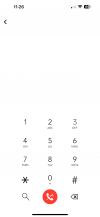
Starting this morning I have several users reporting new behavior. They can no longer transfer calls. I've attached the screen they get. They are using: 18.0 (Build 35) at the PBX and version 20 at the iOS end. Any advice on how to resolve? We've tried all the standard things: restarting services, restarting the server, reinstalling the app on the device, relogging in etc. Transferring calls via desk phone still works fine.

Thanks,
 

Attachments

  • unnamed.png
    unnamed.png
    74.3 KB · Views: 89
OK so we have discussed an improvement to the transfer interface. We will provide an update how fast it can be done.
 
Yeah this new "feature" with "intuitive controls" has fallen flat with 100% of my user base. It is not labelled and adds additional steps to a process that should be as simple as press transfer, select from team or use search box at the top of the list for contacts, transfer. Why do we need a keypad there? To enter extensions and phone numbers that no one bothers to remember because it is 2025 and the days of the rolodex are long over?
 
OK so we have discussed an improvement to the transfer interface. We will provide an update how fast it can be done.
It's been a long time. Is there any news on this topic?
 

Forum statistics

Threads
111,992
Messages
590,171
Members
164,931
Latest member
admintest