Solved Problem with 3CX mobile apps since lastest update

Status
Not open for further replies.

AVF

Customer
Basic Certified
Joined
Oct 19, 2021
Messages
8
Reaction score
10
Im on this one since last monday trying to solve whats going on.

Androids users : cant outbound call, we hear buzy sound then disconnect (same thing happen when composing local extension or external phone number).
Phone is ringing when receiving call, but when we try to take the call, it disconnect.

IOS users : It work on local wifi within the same network as the 3cx server.
But when out of network, Outbound call : We hear a "the number dialed is not assigned" message then it disconnect (same thing happen when composing local extension or external phone number). Inbound calls are always working, even when outside of network.

These phones are up to date, and 3CX is also upto date.

Firewall test passed and the system is on a pro licence and was working without any issue since a few month

Is this problem familiar to someone ? Any clues ?
 
Im on this one since last monday trying to solve whats going on.

Androids users : cant outbound call, we hear buzy sound then disconnect (same thing happen when composing local extension or external phone number).
Phone is ringing when receiving call, but when we try to take the call, it disconnect.

IOS users : It work on local wifi within the same network as the 3cx server.
But when out of network, Outbound call : We hear a "the number dialed is not assigned" message then it disconnect (same thing happen when composing local extension or external phone number). Inbound calls are always working, even when outside of network.

These phones are up to date, and 3CX is also upto date.

Firewall test passed and the system is on a pro licence and was working without any issue since a few month

Is this problem familiar to someone ? Any clues ?
Have you tried the beta apps?
 
Firstly I have to say that the issues you're describing might actually not be related to each other so it might be best to look at each one separately.

To start off, I know you've already mentioned that you're running the latest version but could you please provide the exact version numbers for the PBX, android and iOS apps you're running?

Also, a bit more info on the PBX might prove useful such as where it is hosted, what OS is it running, and on what hypervisor if a VM.

Another good thing to know would be whether these problems occur for every single call you describe or if they come up intermittently. If they apply for every call, try dialing *777 for an echo test instead of calling an extension or external number, do you get the same behavior?
 
  • Like
Reactions: Evolute IT
ChrisC, Thanks for the fast reply, heres whats you're asking :
PBX Version number is 18.0.237
Android version number : 16.7.8.121
IOS version number : 16.1.8.110

Its hosted localy with the Debian package found here.
Linux avf-3cx-srv 4.19.0-18-amd64 #1 SMP Debian 4.19.208-1 (2021-09-29) x86_64

It is currently virtualized on a VMware ESXi, 6.0.0, 15517548

The problem is permanent. Same behavior when calling an echo test.
In order words, it does exactly the same as if i am dialing an unknown extension from my desk phone.
 
ChrisC, Thanks for the fast reply, heres whats you're asking :
PBX Version number is 18.0.237
Android version number : 16.7.8.121
IOS version number : 16.1.8.110

Its hosted localy with the Debian package found here.
Linux avf-3cx-srv 4.19.0-18-amd64 #1 SMP Debian 4.19.208-1 (2021-09-29) x86_64

It is currently virtualized on a VMware ESXi, 6.0.0, 15517548

The problem is permanent. Same behavior when calling an echo test.
In order words, it does exactly the same as if i am dialing an unknown extension from my desk phone.
Just so you know (it shouldn't affect this in any way) but VMware ESXi 6.5+ only is supported with V18.

Also, it's impossible to run v18 on Debian 9. I would strongly advise to reinstall using the 3CX Debian10 ISO.
 
  • Like
Reactions: ChrisC_3CX
Thank you Frederick.
I was running v18RC since the beginning without any issue.
So its now in prod
Im afraid of reinstalling everything... :/

Is reinstalling everything the only thing to do as for now?
 
Thank you Frederick.
I was running v18RC since the beginning without any issue.
So its now in prod
Im afraid of reinstalling everything... :/

Is reinstalling everything the only thing to do as for now?
It's always easier to just backup and reinstall. Get the latest ISO from your customer portal Downloads section.
 
  • Like
Reactions: ChrisC_3CX
Allright...if so then lets fullfill my weekend!
 
Since you'll be going through the process of re-installing I think you should take this opportunity to also update the hypervisor since, as @Frederick Marcoux mentioned, the version currently in use has not been tested with 3CX and is therefore not supported. That way, even if for any reason this does not get resolved upon re-deployment, you'll at least have a fully supported instance allowing you to take this up with our 3CX Support Team if need be.
 
  • Like
Reactions: Evolute IT and AVF
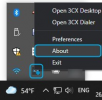
How do I find the version number of the Windows desktop app?
 
How do I find the version number of the Windows desktop app?
Simply right click the System tray Icon and then click on "About":
1635239547577.png

If you are facing an issue or have questions regarding the 3CX Desktop app, please do consider starting a new thread so that we can look into it.
 
Just could find the about button in the app, didn't think about the tray Icon. Thanks
 
  • Like
Reactions: ChrisC_3CX
Just so you know (it shouldn't affect this in any way) but VMware ESXi 6.5+ only is supported with V18.

Also, it's impossible to run v18 on Debian 9. I would strongly advise to reinstall using the 3CX Debian10 ISO.
As a followup on this thread: i would like to tell that obviously, the reinstallation with debian10 iso on vmware 6.7u3 fixed all my issues.
 
As a followup on this thread: i would like to tell that obviously, the reinstallation with debian10 iso on vmware 6.7u3 fixed all my issues.
If possible, move to ESXi 7 when possible as 6.7 will be EOL within a couple years top.

Glad you got it to work!
 
  • Like
Reactions: AVF
As a followup on this thread: i would like to tell that obviously, the reinstallation with debian10 iso on vmware 6.7u3 fixed all my issues.
Excellent news! Happy to hear you managed to sort this out!
 
  • Like
Reactions: AVF
Status
Not open for further replies.

Members Online Now

Forum statistics

Threads
111,831
Messages
589,277
Members
164,660
Latest member
RJenkinsROCK