Solved Problem with music on hold

Status
Not open for further replies.

Malyar

Customer
Joined
Apr 4, 2022
Messages
41
Reaction score
6
Good afternoon.
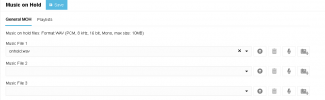
Our MOH has not been working for some time.
No settings have been changed, except for updating from Version 20.0 Update 6 to Update 7.
In other posts, I saw that simply restarting the entire server helped people. But in our case, it did not help.
Re-saving the WAV file did not help either.
If we enable Hold from the 3CX mobile app, everything works fine.
The file is fine. It hasn't changed, it plays and is in the right format.
It doesn't work from our Yealink T31P / Yealink T43U devices.
All firmware on Yealink devices is up to date.

Do I need to make any additional settings on the devices to play MOH?
Everything used to work without any additional settings.

What could be the problem?

1769686652485.png
 
What happens if you stick this file in an IVR prompt and call the IVR from the desk phone?

what is the spec of the 3CX server?
 
@Malyar was this a v18 PBX and you have disabled the " Support Re-Invites " and " Support 'Replaces' header " in the past ?
Then restore the backup on a v20 test PBX ?
 
What happens if you stick this file in an IVR prompt and call the IVR from the desk phone?

what is the spec of the 3CX server?
Okay, we'll run tests with IVR.
Parameters of our two nodes:

CPU 8 CPU(s), 356 MHz used
Memory 16 GB, 1 GB memory active

1 disk - 60gb
2 disk - 300gb
 
@Malyar was this a v18 PBX and you have disabled the " Support Re-Invites " and " Support 'Replaces' header " in the past ?
Then restore the backup on a v20 test PBX ?
Before updating to v20, no changes were made to the server.
We updated to v20 (from v18) on October 25, 2024, and everything worked.
We noticed the absence of HOLD literally 1.5 months ago.
 
Try the following:
  • Disable the trunk (go to Options tab and disable inbound and outbound calls)
  • Temporarily change the Main Trunk Number to allow you to create a new test trunk (go to General tab and append xxx to the Main Trunk Number and the Authentication ID)
  • Add your trunk again and check if resolves
V20's provider templates are improved over v18's, with optimized defaults.
 
Last edited:
Try the following:
  • Disable the trunk (go to Options tab and disable inbound and outbound calls)
  • Temporarily change the Main Trunk Number to allow you to create a new test turnk (go to General tab and append xxx to the Main Trunk Number)
  • Add your trunk again and check if resolves
V20's provider templates are improved over v18's, with optimized defaults.
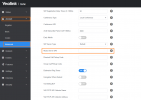
The manufacturer Yealink advised us to do the following:

Option 1 - on the device itself
png.png
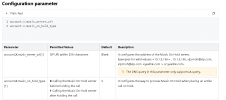
Option 2 - Globally - using firmware changes
1770113790123.png

At the moment, the first method has helped.
The second is in progress.
 
So, the problem is solved. We made changes to the T31P and T43U device templates. MOH is working.
Someone can close this case.
 
  • Like
Reactions: KyriacosS_3CX
what did you do in this field?
 
what did you do in this field?
If we are talking about settings on the device side, I added the IP address of our 3CX server to “Music Server URI.”
If we are talking about the template:
1. account.X.music_server_uri - IP address of our 3CX server.
2. account.X.music_on_hold_type - 1

I would like to clarify once again that we changed the settings on all devices using the template.
 
Status
Not open for further replies.

Forum statistics

Threads
111,972
Messages
590,068
Members
164,888
Latest member
Tim Cook