- Joined
- Sep 14, 2020
- Messages
- 47
- Reaction score
- 2
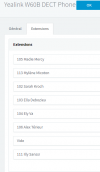
After reading 3CX's guide on Provision Yealink DECT Base, I successfully added Yealink W60B to 3CX under FXS/DECT. Then I followed 3CX's guide on Registering Yealink handset to DECT Base and successfully paired 3 units of W53H to extensions 801, 802, 803 so far.
Unfortunately I am currently stuck, not knowing how to register W56H as Handset #8 (extension 808) first before I have access to and register 4 additional units of W53H (to be assigned to extensions 804, 805, 806 and 807).
This is a problem because It seems handsets can only be paired/registered in the same sequence provisioned by 3CX, and I haven't been able to find a way to register Handset 8 (808) FIRST before the 4 other handsets that I haven't purchased yet. I have tested and noticed that if I press "Start Registering" after only 3 handsets have been registered, W60B will simply register the next one as Handset 4 (804), not Handset 8 (808).
Is there a way to solve this? I haven't found a way to re-assign handsets or change their sequence once they are registered. Help is appreciated.
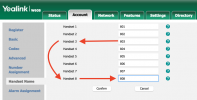
Unfortunately I am currently stuck, not knowing how to register W56H as Handset #8 (extension 808) first before I have access to and register 4 additional units of W53H (to be assigned to extensions 804, 805, 806 and 807).
This is a problem because It seems handsets can only be paired/registered in the same sequence provisioned by 3CX, and I haven't been able to find a way to register Handset 8 (808) FIRST before the 4 other handsets that I haven't purchased yet. I have tested and noticed that if I press "Start Registering" after only 3 handsets have been registered, W60B will simply register the next one as Handset 4 (804), not Handset 8 (808).
Is there a way to solve this? I haven't found a way to re-assign handsets or change their sequence once they are registered. Help is appreciated.
- 3CX Version, Standard Annual 16.0.9
- Server OS, Windows 10
- Is the 3CX Server Hosted and where? Not Hosted
- IP Phones:
- Yealink W60B
- Yealink W56H
- Yealink W53H
- Provisioning Method: Local
- Has the Firewall Checker passed: YES
- Are custom Phone Templates being used: N