Solved Problems with Yealink W80DM and W59R - no dial tone and outbound calls drop!

Status
Not open for further replies.

Shobosh

Forum User
Joined
Jan 22, 2021
Messages
31
Reaction score
7
Dear all,

I am on a customer site (new 3CX business) installing a new 3CX system and I’m having problems.

Environment

1 x Yealink W80DM

2 x Yealink W80D

11 x Yealink W59R

Softphone (3CX Windows app and iPhone/Android apps)

All firmware upgraded as recommended on 3CX/Yealink web site

Problem

The Softphone set up is working fine. However, when dialling outside the company on the W59R handsets: -

  1. There is no dial tone.
  2. When the phone is answered (outside the company) the call drops immediately!? Only happens on the W59R handsets!? Softphone app is fine.

Efforts made to resolve the issue
  1. Religiously followed the instructions on the 3CX help setup/installation screens for the W80DM and W80B base stations.
  2. Performed complete reset (to factory defaults) and tried again. Same result. When making a call to outside the company, the call drops immediately when answered.

Any thoughts/suggestions would be greatly appreciated.

Regards,

Shobosh
 
Hi Shobosh,

What version are:

- your PBX
- W80DM firmware
- W80B firmware
- and what provisioning method did you select for the W80 (Local/STUN/SBC ?)
 
Hi JohnS,

Thanks for taking an interest :-)

- your host PBX - is a 3CX hosted platform.
- W80DM firmware is the latest W80DM-103.83.0.109.rom
- W80B firmware is the latest W80B-103.83.0.109.rom
- Provisioning method is STUN (procedure as here - https://www.3cx.com/sip-phones/yealink-dect-w80p/)
followed religiously.

I confirm *777 gives me echo on the W59R handsets (firmware W59R-115.85.0.35.rom)

Thanks,

Shobosh
 
Ok, in this case since you are using STUN, we highly recommend you read this article, and make the additional changes that STUN requires to work reliably (both at the 3CX side, and at the phone side). The app is not affected by the limitations of STUN, and hence this is mostly likely why it works while the W59R doesn't.
 
Last edited by a moderator:
Most SIP sets have an option, that will present dialtone only if the set is registered. A call may go through, when dialled, but I'd check to see if 3CX sees the set as actually registered, and this, is what is causing that issue.

The 3CX Activity Log may shed some light on what is happening to the calls. Pay attention to how the sets appear to 3CX. it should be PublicIP + a unique local port number, for each device. If a private IP shows in the log, then there may be a STUN setting, on the set, that is not correctly set.
 
Last edited:
Thanks for the suggestion #leejor.

JohnS,

I confirm I have followed the recommended instructions for STUN, thoroughly. I have even performed a factory reset on the W80DM to ensure everything is set up properly. I had to re-provision the W80DM using the provisioning long on the 3CX portal and also had to re-provision all the W59R handsets.

I still have the issue; when using the W59R handsets, we have no dial tone and external calls made are dropped immediately on answering.

I'm really struggling here. Is there anything else I can try?

Should there be any open ports on the remote NAT firewall onto the W80DM? Just a thought.

Regards,

Shobosh
 
You assigned each device a unique local SIP port?

In most cases (and this will vary depending on the router), you should not have to forward the local SIP ports to the IP of each set. Most routers are able to keep track of this, yours might be one, that can't.

At this point it still seems to be a SIP signalling issue with messages not getting through in one direction, given the calls just drop. Once this is overcome, you may find that you have to forward the audio ports, used by each set or you may have no audio, or one-way audio.

Did you set each extension, in 3CX, to use PBX Delivers Audio?
 
Hi #leejor

I confirm each extension provisioned on the W80DM is set to enable "PBX Delivers Audio" within the 3CX host portal.

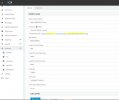
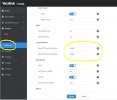
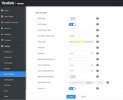
Regarding the set up of the 3CX host and the W80DM, please see the attached screen shots of the set up.

Regarding the router, it is a Draytek V2860n with the latest firmware (3.9.1)

I'm not sure exactly how to assign a SIP port to each extension with this set up. I have tried forwarding port 14000 thru 14599 on to the W80DM, which does not resolve the problem.

I'm kinda stuck, still.

Best,

Shobosh
 

Attachments

  • 3CX host set up.jpg
    3CX host set up.jpg
    26.9 KB · Views: 36
  • W80DM advanced network setup.jpg
    W80DM advanced network setup.jpg
    24.3 KB · Views: 39
  • W80DM provisioning.jpg
    W80DM provisioning.jpg
    22.9 KB · Views: 36
So realistically, the fix is to setup a SBC. 3CX does not support STUN with 3CX Hosting:

https://www.3cx.com/docs/3cx-tunnel-session-border-controller/

With a SBC, you need zero port forwarding and everything will just work like the app does.


Otherwise, you need to re-read the documentation links provided to you. You need to configure each extension with a unique SIP and RTP port range per extension on the provisioning page, and then you need to forward those ports to the device.
 
Last edited by a moderator:
One other thing I failed to mention, I also have a Yealink CP 920 (Conference Room) handset today, which uses STUN. It's working perfectly.

There is something very odd about this W80DM !?
 
Nothing wrong with the phone, the problem is STUN as it's been indicated several times and why 3CX doesn't support STUN with 3CX hosting.
 
Thanks for your contribution #cobaltit

However, this statement is not quite true "3CX does not support STUN with 3CX Hosting"

We have several customers using W60B DECT base stations accessing 3CX hosted PBXs using Draytek routers configured with W56H handsets. All working fine.....

Regards,

Shobosh
 
#cobaltit

I guess the point you're making is that while we have managed to get STUN to work on certain hosted 3CX hosted environments, it just isn't supported. ;)

So, with is in mind, I think the real question for this forum is - has anyone managed to get a Yealink W80DM working: -​

- with STUN​

- with a 3CX host (not on site)​

- without an "all ports open" VPN between the Yealink W80DM and the 3CX hosted PBX?​

I suspect this question will be met with stony silence.

Thanks for taking the time to read these posts.

Regards,

Shobosh
 
#cobaltit

I guess the point you're making is that while we have managed to get STUN to work on certain hosted 3CX hosted environments, it just isn't supported. ;)

So, with is in mind, I think the real question for this forum is - has anyone managed to get a Yealink W80DM working: -​

- with STUN​

- with a 3CX host (not on site)​

- without an "all ports open" VPN between the Yealink W80DM and the 3CX hosted PBX?​

I suspect this question will be met with stony silence.

Thanks for taking the time to read these posts.

Regards,

Shobosh

Hi Shobosh,

The answer is yes - I setup one here in our office and connected it to a remote PBX in the cloud. It can make and answer calls fine.

Also you will absolutely have to setup the remote firewall - this is a requirement for STUN.

The thing with STUN is that it's reliability is not guaranteed, hence some device will work and others won't - at the same site - even using the exact same hardware - unless you take those actions.

If you are not sure how to set it up then worry not - we created the 3CX SBC just for this reason

- You don't need to make any port forwards
- You don't have to setup static IPs on phones
- You don't have to change any other settings on the router
- You don't have to enable PBX Delivers Audio

So now you are aware of your options: either spend time with the Draytek until you get it right or spend zero time with it and setup an SBC that takes care of these issues.

PS: Now you also know the reason why 3CX officially does NOT support STUN for "Hosted by 3CX" plans. There is simply no reason to put the customer through the pain of setting up STUN when the SBC is here to do the hard work for you, the admin.
 
Last edited by a moderator:
Guys,

Thanks for all your valuable contributions. I confirm I installed a SBC last night (only took 20 minutes :) ) and the one W80DM and two W80B base stations are working perfectly.

Grateful for all your valuable help.

Please mark this thread as SOLVED.

Much obliged,

Shobosh
 
Excellent news Shobosh, you are very welcome!
 
Status
Not open for further replies.

Members Online Now

Forum statistics

Threads
111,831
Messages
589,277
Members
164,660
Latest member
RJenkinsROCK