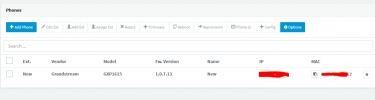
First thanks for your time and patience, here everything I have done so far
Enviroment
-VMware ESXi
-4 vCPU / 8GB Ram / 120GB
-3CX VMware Appliance (Debian)
-Phone Grandstream GXP-1615
-Local provision not remote
-Cloudflare Proxy
-Cloudflare SSL
-IP Blacklist is Empty
-No network restrictions
-Other extensions work fine with mobile app, windows desktop app and web client
Steps I have taken so far in the following order
- Power up phone connected to local network, same network as 3CX PBX, login to the phone webpage and factory reset (also try directly on the phone before)

Phone reboots
-Two red lights come up
-Message “Loading user data … done” show on screen
-Then Shows 1969-12-31 and 7:20 p.m
-Then Shows today 7/4/2022 and 5:30 p.m
I login to the phone site and the login credentials are default so it did reset, firmware version is the one supported by 3CX, the first time the phone was connected 3CX suggested the FW Version 1.0.7.13 so I proceed and click on update

Here I select the phone and then Assign Ext


New extension 1010, never used, no settings no nothing, have other extensions working with webclient, desktop app and mobile app without problems, keep in mind this is a local provision
As shown on next screen, phone showing up is same MAC and Interface is on the local network where the 3CX PBX is running

***AT THIS POINT IS IT NORMAL THAT I CLICK ON THE PROVISIONING LINK AND I GET A 403 FORBIDDEN??***

After this screen just click ok and takes me to the next screen

After all this I just wait but the phone never reboots or come up with any message on the screen, waited 15 minutes and nothing
Here the phone settings after the entire process

This are all the steps shown on the 3CX Provisioning Local IP Phone, that Im sure it works but its not working in my case
Things I have notice while dealing with this inconvenience
If I go back to the Phones screen, select the phone and click on Add Ext or Assign Ext this message comes up so the PBX knows this phone is assign already

Next, on the phone site there is a Provision Start button, 3CX Auto Provision “Yes” and the Config Server Path is the provisioning link so I click the START button eventually the phones comes up with message “Load config…failed”


After this nothing happens, phone doesnt reboot and still showing as “New” under Phones at 3CX Dashboard
The phone has a “3CX Auto Provision” options on the Menu
Menu Button->System->Upgrade->3CX Auto Provision
If I try this the phone eventually after a few minutes shows message “Reboot now?”
Press the Reboot button and wait for it to reboot
Wait about 10 minutes, go to the 3CX Dashboard and phone still shows without Ext.
This is the only phone in the network
At this point based on the information I have found online I dont know what can be wrong, I even try deploying a 3CX Windows instance but its the same situation, I dont mind redoing everything again since this is just my lab but really want to know what Im doing wrong
Thanks for your time