• We do not provide troubleshooting help for unsupported phones. Please try with a supported phone.
  • V20 Update 10 Alpha Learn more

Solved Provision Grandstream GXP1615 Frustrating

Status
Not open for further replies.

netgama

New User
Joined
May 29, 2022
Messages
13
Reaction score
1
This is suppose as simple as "Assign Extension" but its not working for me, after assign extension the phone still shows as "New" under Ext but if I try to assign extension again it says its already assign to the one its suppose to be assign, and when call the assign extension it doesnt ring, the phone is DHCP, basic local setup, no remote setup, 3CX version 18.0 (Build 461) , pls advice, thanks
 
Hi, thanks for the reply, this is what i did

1.Delete phone on provisioning tab for the user
2.Phone running supported firmware for GXP-1615 1.0.7.13
3.Factory reset the phone
4.Assign phone to extension, Phone Provisioning, select phone and paste mac
5.Interface is server ip
6.Phone provision, ask to reboot, reboot it

Steps are basically the same as on this video

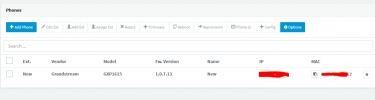
If i go to Phones it still appears as "New" under the "Ext.", if I call the extension phone doesnt ring, calls goes to voicemail

To test the Ext I setup my iphone with the 3Cx app and the extension works, dont know what to do, please advice

Thanks
 
Last edited:
Also do all the process again and instead of "Assign Ext" I select the phone and use "Add Ext" all I get are blue and yellow lines at the top of the page and nothing happens it just stays there, if im not mistaken I should get a prompt to create an extension, try different browsers in case is something with the browser, chorme, edge, firefox, brave, even build up a new VM with windows in case is something wierd with my cookies, i know it might not do any difference but its suppose to be so simple and I still cant get it to work
 
I just notice when I try to push the config from the phone admin page I get "Load config...failed"
 
At this point dont what way is up....I just deploy a new 3CX PBX on Windows
1. create extension
2. factory reset phone
3. made sure Im using firmware 1.0.7.13 from 3cx website
4. assign phone to extension, Phone Provisioning, select phone and paste mac
5. interface is server ip

And still cant get the phone provision
 
in your step 4, not sure why you are pasting the Mac Code

as you are running windows, have you excluded
  • C:\Program Files\3CX Phone System\*
  • C:\ProgramData\3CX\*
removed any settings within 3cx.
factory default the phone

do you see the unassigned phone as step 3.2, if so continue following the steps to 3.5 https://www.3cx.com/sip-phones/grandstream-gxp16-series/
 
thx for the reply, my main installation is on debian, did a windows install just to test since i dont know whats wrong, same for adding the phone manually pasting the mac, i do see the phone unassigned and did follow the steps on the link you paste but the phone wont do anything
1656836862195.png
Just stays like this
 
Just to confirm

In the above sign, select the phone by clicking in the square icon on the left of the phone.if you select ’add ext’ or ‘assign ext‘ nothing happens. This will brings up the provisioning screen , make sure the interface is the IP address of the 3cx server, and finally click on ok

look at the 3cx blacklist ip’s on the first screen and delete any entries.

log at the activity log to see if you can see any error messages
 
The Grandstream guide cover this fully and I can confirm that this works.

But keep in mind, the GXP1615 might take upto 5 minutes to provision.

It is a very slow phone, so be patient with it.
 
Hi guys, thanks for your reply, Im not saying the guide doesnt work, I want to understand why its not working for me, everything else so far with the pbx works, today Ill do a complete post with what I have done so far with screenshots, this is my first time using an ip pbx, have done Cisco PBX installation before but have never work with virtual pbx, should be very similar and Im sure 3CX works,it has to be something with my setup or the phone I bought is broken, but thats what Im trying to find out
 
As a first step, you might have to run a capture on your PBX, and see if the IP of the phone tries to connect to the IP of the PBX.
 
Yes thats something I had in mind but dont know how to do it, can you please point me to documentation or tutorial on how to this please, thanks
 
First thanks for your time and patience, here everything I have done so far

Enviroment
-VMware ESXi
-4 vCPU / 8GB Ram / 120GB
-3CX VMware Appliance (Debian)
-Phone Grandstream GXP-1615
-Local provision not remote
-Cloudflare Proxy
-Cloudflare SSL

-IP Blacklist is Empty
-No network restrictions
-Other extensions work fine with mobile app, windows desktop app and web client

Steps I have taken so far in the following order

  • Power up phone connected to local network, same network as 3CX PBX, login to the phone webpage and factory reset (also try directly on the phone before)


Phone reboots

-Two red lights come up
-Message “Loading user data … done” show on screen
-Then Shows 1969-12-31 and 7:20 p.m
-Then Shows today 7/4/2022 and 5:30 p.m

I login to the phone site and the login credentials are default so it did reset, firmware version is the one supported by 3CX, the first time the phone was connected 3CX suggested the FW Version 1.0.7.13 so I proceed and click on update


Here I select the phone and then Assign Ext


New extension 1010, never used, no settings no nothing, have other extensions working with webclient, desktop app and mobile app without problems, keep in mind this is a local provision

As shown on next screen, phone showing up is same MAC and Interface is on the local network where the 3CX PBX is running


***AT THIS POINT IS IT NORMAL THAT I CLICK ON THE PROVISIONING LINK AND I GET A 403 FORBIDDEN??***


After this screen just click ok and takes me to the next screen


After all this I just wait but the phone never reboots or come up with any message on the screen, waited 15 minutes and nothing

Here the phone settings after the entire process


This are all the steps shown on the 3CX Provisioning Local IP Phone, that Im sure it works but its not working in my case


Things I have notice while dealing with this inconvenience

If I go back to the Phones screen, select the phone and click on Add Ext or Assign Ext this message comes up so the PBX knows this phone is assign already


Next, on the phone site there is a Provision Start button, 3CX Auto Provision “Yes” and the Config Server Path is the provisioning link so I click the START button eventually the phones comes up with message “Load config…failed”


After this nothing happens, phone doesnt reboot and still showing as “New” under Phones at 3CX Dashboard

The phone has a “3CX Auto Provision” options on the Menu

Menu Button->System->Upgrade->3CX Auto Provision

If I try this the phone eventually after a few minutes shows message “Reboot now?”

Press the Reboot button and wait for it to reboot

Pasted-12.png


Wait about 10 minutes, go to the 3CX Dashboard and phone still shows without Ext.

Pasted-13.png


This is the only phone in the network

At this point based on the information I have found online I dont know what can be wrong, I even try deploying a 3CX Windows instance but its the same situation, I dont mind redoing everything again since this is just my lab but really want to know what Im doing wrong

Thanks for your time
 
Have you tried using a proper RFC1918 network?
 
do you mean change try with a different subnet?
 
Have you tried using a proper RFC1918 network?
I think you are into something, I start reading about what you said and decided to turn on that other 3CX instance what Im running on windows and decided to do a p2p connection, seperate subnet just went basic 192.168.0.*/24 no dns, no gateway just plain p2p and try to provision the phone, nothing happen, then decided to go with 3CX Auto Provision from the phone website and it work perfectly, phone pick up the config and I was able to call from the phone to a another extension that was using the webclient, appreciate your help very much @cobaltit
 
You network setup, does not meet rfc1918 network - allowed private ip addresses https://netbeez.net/blog/rfc1918/

3cx is programmed to only work on rfc1918 networks , this can not be changed
 
  • Like
Reactions: JohnS_3CX
true and thanks for your help guys, Ill be doing proper changes over the weekend
 
1657007452172.png
Indeed this was the telltale sign of the problem: 3CX will not allow LAN phones to provision over a network that is not RFC1918 compliant. This is a requirement that you will also see in our installation guide:

1657007528014.png

This will lead to 100% failure during provisioning, so kindly ensure that both the 3CX system and the phones are all in the same subnet that follows the RFC1918 ranges and the problem should be resolved.

You will have to reboot the 3CX server after the IP change, and in the management console there will be a red message of IP mismatch. Click on it, then press OK so that the system will accept the new IP that the machine has, and you are now ready to provision your phones from scratch.
 
Status
Not open for further replies.

Members Online Now

No members online now.

Forum statistics

Threads
111,831
Messages
589,277
Members
164,660
Latest member
RJenkinsROCK