- Joined
- Feb 3, 2017
- Messages
- 4
- Reaction score
- 1
Hey 3CXers!
This has been happening for a while and I thought I would make a post about it. I just hope that I'm doing something stupid.
Some background info:
- Using Self Hosted 3CX v18.0.7.312
- Using PWA in Chrome (Chrome v115.0.5790.171)
- Windows 10 Pro 22H2, 1920x1080 at 100% display scaling (if it's relevant for my issue)
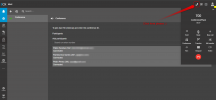
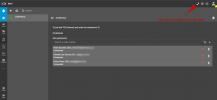
When I start a conference call in the 3CX PWA, I cannot seem to access the conference control buttons (to the right of who is connected) while I am also in the call. In order to see those buttons I have to disconnect from the call myself. I typically have the PWA occupy one half of my monitor. Extending the PWA window to utilize the full screen doesn't seem to help matters so I doubt it's a display / scaling issue. I've included an image and circled where those buttons are located under the dialer (but I'm sure everyone here knows what's supposed to be there).
Aside from using another platform to be a participant, is there any simple solution I'm missing here or is this an overlook on the design of the PWA?
This has been happening for a while and I thought I would make a post about it. I just hope that I'm doing something stupid.
Some background info:
- Using Self Hosted 3CX v18.0.7.312
- Using PWA in Chrome (Chrome v115.0.5790.171)
- Windows 10 Pro 22H2, 1920x1080 at 100% display scaling (if it's relevant for my issue)
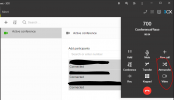
When I start a conference call in the 3CX PWA, I cannot seem to access the conference control buttons (to the right of who is connected) while I am also in the call. In order to see those buttons I have to disconnect from the call myself. I typically have the PWA occupy one half of my monitor. Extending the PWA window to utilize the full screen doesn't seem to help matters so I doubt it's a display / scaling issue. I've included an image and circled where those buttons are located under the dialer (but I'm sure everyone here knows what's supposed to be there).
Aside from using another platform to be a participant, is there any simple solution I'm missing here or is this an overlook on the design of the PWA?