QR code missing from Welcome Letter

Status
Not open for further replies.

rbergthold

Silver Partner
Advanced Certified
Joined
Aug 24, 2021
Messages
159
Reaction score
37
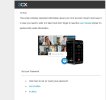
Hi. we just did a new system, and we are not seeing QR code on welcome letter sent to users. we can get to it via the web client; but that kind of defeats the purpose of being able to scan QR code and go. I'm wondering if I did something incorrect on this deployment, as this is the first system i've seen this happen on. Thanks in advance for your help!
.
 

Attachments

  • no QR code at top of welcome.jpg
    no QR code at top of welcome.jpg
    52.1 KB · Views: 30
Hello there.
Indeed this is expected in the new update 7A build of the V18, as well as no attachment with the config file and passwords.
You will need to sign into the Web client or the PBX management console to get the QR code.
 
  • Like
Reactions: ElenaF_3CX
ok, fair enough. i just wanted to make sure i didn't make a mistake, as i did a system a couple of weeks back and that wasn't the case. did the 7A build just drop in the last week or so?
 
when provisioning system, if it tells me there's an avail update, i usually load. we're on:
18.0 Update 7 (Build 441)
 
On that line though it will say Alpha or Beta. Still better to set automatic updates so it installs any Debian security updates.(if Debian)
 
that's what is throwing me. it does not. unless i'm just blind, lol!
 
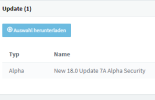
x.441 ist an Alpha Version. The last official is x.312. It clearly states this before you update: 1684937377134.png
 
Hi,

424 was the Alpha (which needs to be applied first), and 441 is the Beta.
https://www.3cx.com/blog/change-log/phone-system-change-log/

We only auto-update to final releases, alphas/betas need to be applied manually from the management console.

The new welcome email asks the user to set a password first, and then once they have secured their account they can log in to the web client where they have access to

- QR
- All apps
- App config
 
  • Like
Reactions: bitn2
that's fair; but after you update. it tells you nowhere that your are on Alpha or Beta. it would be nice if it stated that on the either the Dashboard or License page. i assumed it was on ALPHA; but couldn't remember. Thank You All. i appreciate your replies
 
Hi,

424 was the Alpha (which needs to be applied first), and 441 is the Beta.
https://www.3cx.com/blog/change-log/phone-system-change-log/

We only auto-update to final releases, alphas/betas need to be applied manually from the management console.

The new welcome email asks the user to set a password first, and then once they have secured their account they can log in to the web client where they have access to

- QR
- All apps
- App config
an all-in-one answer, go John! anyways, thanks again, EVERYONE.
 
Understood, but if you ever want to quickly check in the future you can bookmark our main changelog to quickly glance at what's currently out.

This link will give you the info on the main PBX product as well as all our various apps:
https://www.3cx.com/blog/change-log/

1684938325605.png
 
Hi,

424 was the Alpha (which needs to be applied first), and 441 is the Beta.
https://www.3cx.com/blog/change-log/phone-system-change-log/

We only auto-update to final releases, alphas/betas need to be applied manually from the management console.

The new welcome email asks the user to set a password first, and then once they have secured their account they can log in to the web client where they have access to

- QR
- All apps
- App config
Since a (fairly recent) final release permanently broke Hotdesking for almost all of our existing phones and we had to panic replace pretty much all of our endpoints we don't do automatic updates any more...
 
Since a (fairly recent) final release permanently broke Hotdesking for almost all of our existing phones and we had to panic replace pretty much all of our endpoints we don't do automatic updates any more...
Without automatic updates no Linux updates. You could switch it on for some hours after your update to get the recent Linux updates.
 
  • Like
Reactions: Lee Cramman
Hey Guys i know this is an old post just having some issues with starting my own thread.

i am having an issue with 3cx welcome emails not reflecting the QR code nor the webclient login password, for any extension since v18 update 8.
I have sent a welcome email from one of my customers 3cx instances which is still on v18 update 7, and the 3cx welcome mail has both the QR code and the webclient login/password credentials.

Not sure if this is a bug in the new update 8 or if anyone else is having the same issues.

I have compared the welcome template on v18 update7 to the new v18 update 8(build917) and there is no difference between the 2 templates.
 
Hey Guys i know this is an old post just having some issues with starting my own thread.

i am having an issue with 3cx welcome emails not reflecting the QR code nor the webclient login password, for any extension since v18 update 8.
I have sent a welcome email from one of my customers 3cx instances which is still on v18 update 7, and the 3cx welcome mail has both the QR code and the webclient login/password credentials.

Not sure if this is a bug in the new update 8 or if anyone else is having the same issues.

I have compared the welcome template on v18 update7 to the new v18 update 8(build917) and there is no difference between the 2 templates.
Did you read the release notes? When you using the original template there is an link to change your password. QR code you will find in the webclient.
 
Hey Guys i know this is an old post just having some issues with starting my own thread.

i am having an issue with 3cx welcome emails not reflecting the QR code nor the webclient login password, for any extension since v18 update 8.
I have sent a welcome email from one of my customers 3cx instances which is still on v18 update 7, and the 3cx welcome mail has both the QR code and the webclient login/password credentials.

Not sure if this is a bug in the new update 8 or if anyone else is having the same issues.

I have compared the welcome template on v18 update7 to the new v18 update 8(build917) and there is no difference between the 2 templates.
Hi Clinton,

This has been removed as of update 8 as part of our increased security efforts. It will no longer be possible to include QR codes in the welcome email.

Our welcome email now contains a link that lets you set your own password and connect to the webclient.

Once you login, you may find your QR there on the top right, and you can also configure all your apps from the bottom left.
 
  • Like
Reactions: Evolute IT
Hi,

We were used to having the attachment and QR codes in Extension Welcome emails.

One day they disappeared, but the QR code image placeholder with a broken image is still showing.

If we go to system settings and change the parameter, both come back. Since this is a move by 3CX to shift away from QR Codes, we'd like to come on board with this change as well.

How can we get / load shipped email templates? We're hoping that the updated templates have been corrected for the changes not to have QR. Or perhaps this is an oversight?

shak
 
Status
Not open for further replies.

Members Online Now

Forum statistics

Threads
111,832
Messages
589,285
Members
164,662
Latest member
DejanMDS