Question about SBC install

Status
Not open for further replies.

TLCtech

Customer
Joined
Oct 12, 2020
Messages
263
Reaction score
29
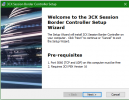
Our site is installing IP phones. I need to get an SBC going. When I go to install that, it says I need the 5060 TCP/UDP ports open and that I need 3cx V16 PBX installed.

I installed the PBX but it wants me to set it up. I have an instance hosted already. Im worried that installing this will mess something up. Do I continue with set up, restoring a back up I guess, or do I wait and start the SBC install? If someone could point me in the right direction, that would be great. The install doc here doesnt mention the PBX at all, so Im kind of confused.

https://www.3cx.com/docs/3cx-tunnel-session-border-controller/#h.iv6mgznweiq6

Thanks in advance.
 
Thanks for the move admin! My bad!
 
I am also confused, particularly about this statement:

I installed the PBX but it wants me to set it up. I have an instance hosted already. Im worried that installing this will mess something up

So do you have the PBX installed and setup or do you not have it installed? What step of the SBC setup are you on? What are you installing the SBC on?
 
You install sbc on a machine in the local network where the phones are located. NOT ON THE 3CX SERVER

https://www.3cx.com/docs/3cx-tunnel-session-border-controller/

It uses 3cx tunnel. (udp/tcp 5090) and https port outgoing, so no local firewall changes are required unless you block outgoing ports make sure
 
This is what I see when I try to install the SBC on a local machine. It says I need the PBX. Is that not the case?

I have a hosted PBX. Thats why I stopped. This doesnt seem right.
 

Attachments

  • 3cx sbc.PNG
    3cx sbc.PNG
    142.5 KB · Views: 9
It says it requires PBX Version 16. It doesn't say it's installing PBX Version 16. And yes, Port 5060 on that machine needs to open. Phones communicate with the SBC on 5060, SBC communicates with the PBX on 5090.

Just make sure you are downloading the latest SBC version linked in the SBC install guide you posted. It could be they never updated the install language to say v18, but it could also be you are installing an old SBC version
 
I took it to mean "at least v16". If it requires it, why do I not need to install it? Does it mean it requires it "somewhere" to talk to? This is very vague.
 
The 3CX server is your phone system (which, it sounds like, you already have). The SBC software connects to that same phone system. The network with the SBC device/VM does not need any inbound ports open in its firewall.
 
@TLCtech
The PBX requirement merely means you must have a 3CX PBX somewhere to connect the SBC to. Since you already have a PBX that is the one you'll use.

TCP port and udp only need to be locally available so just make sure there's no firewall on the host's OS(NOT the network firewall) blocking those ports.

Just make sure you are downloading the latest SBC version linked in the SBC install guide you posted. It could be they never updated the install language to say v18, but it could also be you are installing an old SBC version
@cobaltit is right, the 3CX SBC v18 installer does still mention 3CX PBX v16 but we are aware of it and this will be addressed in a future release. just make sure you've downloaded the latest version from our new portal and you should be fine.
 
  • Like
Reactions: TLCtech
Status
Not open for further replies.

Forum statistics

Threads
111,974
Messages
590,083
Members
164,901
Latest member
Silent_Guru