Solved Queue calls and Automatically switch status to available during office hours

Status
Not open for further replies.

lbonjean

Customer
Basic Certified
Joined
Dec 8, 2021
Messages
19
Reaction score
3
Hi,

A user has in his 'Availbale' status settinge 'log out from queues' not ticked
In DND status 'log out from queues' is ticked

Automatically switch status to available during office hours is enabled.

Office hours are from 7 to 14.

At 10:30 user remains available but logs out himself from the queue.
At 14:00 his status is set to DND automatically.

At 7:00 the next day his status will be set to available.
But does he get logged in to the Queues at that time?
A user claims he is not.
What is the expected behaviour?

Thanks,

Luc
 
Hi @lbonjean,

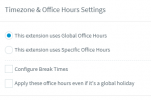
What you can expect is that both the Global office hours and the specific hours set on the extension level will set the extension to DND and log them out of all queues. Once the PBX comes back in office hours, the extensions will become available and log back into the queues.

Ensure that the extension has Auto Switching enabled in the Forwarding Rules and that it's following the Global Office Hours and doesn't have something specific set up for it.

1639574950955.png
 
  • Like
Reactions: Evolute IT
Also check that the user didn't just logout explicitly from the queue.
 
  • Like
Reactions: VasilisV_3CX
The user indeed logs out explicitely from the queue during the day, but the next day he should be back in the queue.The problem is that the user forgets the next day to put himself back in the queue.
I can reproduce without auto switch, just define it correct in the statuses and then do
- available
- log out of q
- DND
- back into available --> user gets not back in the queue.

We also tried an available2 status that logs him out of the queue, but then the Auto switching doesn't work. Wich gives in the end the same problem.
 
The user indeed logs out explicitely from the queue during the day, but the next day he should be back in the queue.The problem is that the user forgets the next day to put himself back in the queue.
I can reproduce without auto switch, just define it correct in the statuses and then do
- available
- log out of q
- DND
- back into available --> user gets not back in the queue.

We also tried an available2 status that logs him out of the queue, but then the Auto switching doesn't work. Wich gives in the end the same problem.
If he logs out explicitly, he won't be auto-logged in.

Thus the name "explicit".
 
Any other way to log a user forced in in the Q?
 
Hi @lbonjean,

We also tried an available2 status that logs him out of the queue, but then the Auto switching doesn't work. Wich gives in the end the same problem.
Yes, both Custom statuses will keep you logged in / logged out and won't adhere to any global office hours switching, this is correct. It is described here: https://www.3cx.com/3cxacademy/videos/intermediate/configuring-extensions/ (slide 8).

Any other way to log a user forced in in the Q?
No, unfortunately not. I'd suggest telling the user to make a note.
 
  • Like
Reactions: Evolute IT
To make a note is exactly what I would like to avoid.
Simple explain to them how to use global vs explicit login? A quick 5min call can probably be enough.
 
  • Like
Reactions: VasilisV_3CX
Hi @lbonjean,

As the question was answered, I'll close the thread now. If you require any further assistance or information, feel free to let us know.
 
Status
Not open for further replies.

Forum statistics

Threads
112,308
Messages
591,806
Members
165,448
Latest member
Rhameez