Random "You Are On Hold" Message heard when callers are on hold

Status
Not open for further replies.

Andotek

Trial User
Basic Certified
Joined
Mar 30, 2021
Messages
13
Reaction score
1
Hi Team,

I have call queues setup with music on hold playlists associated with them. I also have general MOH setup for when users put people on hold.

Randomly I have issues where an attendant will pickup a phone call from a queue and then put the caller on hold. Instead of hearing the generic music on hold playlist they will hear a "You are on hold" prompt repeatedly which gets annoying for the caller to listen to whilst on hold.

This only happens randomly. We are running Grandstream GXP2170 phones.

Where would this prompt be coming from and why is it happening for random callers?

Andrew
 
Hi @Andotek,

There isn't, by default, a system prompt in 3CX mentioning the phrase "You are on hold". You can check your system prompts under Settings >> System Prompts. Search for "hold". If you don't find this phrase it means that it is not 3CX facilitating the prompt.

Have you installed any third party applications on the server which may be causing this?

Are the phones using any custom templates and is the firmware up to date? It's highly unlikely that it would be the phones, but worth checking as it can't be entirely ruled out.
 
Hi @VasilisV_3CX ,

Thanks for your reply. I have to confirm the exact message. The staff have told me it just keeps repeating and goes for around 5 secs. Ill confirm the exact wording of the message heard. We are running the latest firmware on devices and latest 3CX version 16 patch 9.
There is no custom templates its all default.
I have logged a job with support and we have managed to packet capture and log verbose logging whilst the caller is hearing this unusual message so fingers crossed we can pin point where its coming from.
You are correct in that I couldnt find an onhold message in the default templates but I suspect maybe the phones are doing it! The question is why!
Andrew
 
Hi @Andotek,

Great to hear that you've captured a log and sent it on to support. Keep us posted with regards to the outcome.
 
Could it be the handset itself giving this message if users are using buttons from the phone? Are you able to provision a mobile app and call a phone and give it a try with the hold button? just a thought.
 
Check all your SIP trunks under their Options >> Advanced

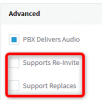
1617107834669.png
Make sure you have disabled these two settings.
Does the problem go away?
 
  • Like
Reactions: Andotek
Hi @JohnS_3CX ,

I can turn these off. These are both currently enabled.

Andrew
 
Could it be the handset itself giving this message if users are using buttons from the phone? Are you able to provision a mobile app and call a phone and give it a try with the hold button? just a thought.
Could be. Its very random and the process it repeated all the time so I cant pin point it to a given flow or action taken.
 
  • Like
Reactions: VasilisV_3CX
Go ahead and leave them off. The problem should go away.
Hi John,

Since the changes were made the problem is still occuring very randomly. I was hoping that this would resolve itself but hasnt. Currently I have a support ticket open and we will continue to investigate.
 
Could be. Its very random and the process it repeated all the time so I cant pin point it to a given flow or action taken.
Its very intermittent so its hard to prove. It could be. The receptionists that we have in sales and service only have access to the phone handsets.
 
Ok we have identified that the onhold message is a recording that is stored in both our MOH and Queue Playlists.
It only goes for 3 secs.

I managed to replicate the issue by calling the queue internally. Once picked up I asked the attended to put me on hold where I heard the 3 sec on hold message just repeat continually. It did not move to the next track in the MOH list. This might be a bug in the software? I was under the assumption that because we have 9 different on-hold recordings configured it would loop through them all. I have selected the "Randomize" Per Day setting.

Can anyone tell me how the MOH is programmed to work?
 
Ok we have identified that the onhold message is a recording that is stored in both our MOH and Queue Playlists.
It only goes for 3 secs.

I managed to replicate the issue by calling the queue internally. Once picked up I asked the attended to put me on hold where I heard the 3 sec on hold message just repeat continually. It did not move to the next track in the MOH list. This might be a bug in the software? I was under the assumption that because we have 9 different on-hold recordings configured it would loop through them all. I have selected the "Randomize" Per Day setting.

Can anyone tell me how the MOH is programmed to work?

Ok so figured out today that the

The "Randomize music on hold per call" option will pick one file per call and repeat it while the "Randomize music on hold per day" will pick a random file and play that for the whole day.
These files will be played when 3cx extension put call on HOLD from queue.

So it wont pick random files and play them continously. It will just choose 1!!!!!!
 
  • Like
Reactions: NickD_3CX
Status
Not open for further replies.