Raspberry Pi 5 - SBC ?

Status
Not open for further replies.

Connexium

Silver Partner
Joined
Feb 23, 2019
Messages
51
Reaction score
34
Due diligence Disclaimer: I am truly sorry if this has been posted before. Since the forum limits keyword search of 3 characters or less it makes it incredibly hard to find information like this. I also tried using Google without luck.

My question is with the availability of the Raspberry Pi 5. Could it be used for an SBC? I need to purchase several units and was hoping to "future-proof" my purchase with the PI5 variant if possible.

I don't know much about any OS Version limitations for specific Pi models that could affect or prevent the installation of the SBC on a rPi5, but as far as I remember, the current SBC ISO is based on an old version of Debian.

Lastly, I am not talking about 3cx PBX, but only the SBC.

Thank you for any clarifications.
 
We haven't yet tested or released the 3CX SBC for Pi5, I'm afraid. We do not as yet have an ETA on when it will be.
 
Thank you. I will keep an eye out for updates about this. Have a good one.
 
I have used one of the older intel NUCs and they work great and can be had cheaply [but not cheap as a Pi]
 
Hey, thanks.
My question was not really about the price or availability. I was just hoping to "future proof" my upcoming purchase of SBC. I will stick with Pi4 until 3cx makes an announcement.

Cheers
 
At the moment you may keep in Pi4 or consider another on premise solution.
 
  • Like
Reactions: Connexium
To my understanding the Raspberry Pi 5 runs Debian 12 - so yes we will support SBC on raspberry PI 5. However we need time to document and test but if you have time give it a shot it may well already work
 
Last edited:
Thanks, I will try to add a rPi5 on my next order.

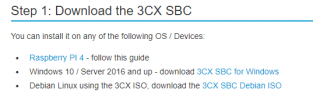
Current SBC images use Debian 10 right?

1701551523807.png
@Nick Galea
Is there an official/recommended way to install on Debian 12 via CLI then?
Or a link to a Debian 12 ISO somewhere I missed?
 
Hi Guys,

Is there any update about this. Do we know when we can use a Raspberry Pi5 as an SBC please?

Thanks :)
 
Hi folks
I can only purchase Pi 5's at the moment no 4's available, so need to be able to get these configured (SBC's) for several upcoming installs.
Is there any support on these Pi 5's yet?
 
we have a few of the old Pi 3 left and are hoarding them for emegency backups with all the other pi3 sbcs we have out there. most of those customers are old enough that they don't have phones capable of being router phones. great platform but we know that day is coming when they are not going to be capable of being used as 3cx SBCs anymore.
 
I can configure the PI 5 networking etc right up to the 3CX SBC install screen (after the wget http...etc), and then it won't allow me to click 'ok' on the 3CX pre-requisites.
I'm no pi\linux guru, anyone got any pearls of wisdom to get it to continue?
I used bookworm-lite image, maybe that's the issue? The Pi didn't like the buster-lite image from the 3CX SBC page.
 
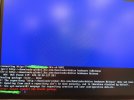
OK, played with the install command and got a bit further, but....

IMG_20240214_172321760.jpg

Is this something that 3CX can rectify?
I would really like to be able to use the 6 PI 5's I've just purchased :)
I'm happy to test something if it will benefit others?
 
I have the same issues as you afit. I have tried to get my Pi 5's to load the 3cx debian 10 images but they will not boot with these images. Raspbian imager no longer has a debian 10 buster option, feels like which ever version of raspbian imager you get you cannot get debian buster anymore. I also tried the ubuntu version that is designed for the Pi5 but the 3cx software will not install. Same issue - you cannot press ok. I have ordered a pi 4 now for my first 3cx site.

Hoping 3cx can make SBC work on Bookworm or Bullseye. Specifically on a pi5 would be great. Thanks
 
I have the same issues as you afit. I have tried to get my Pi 5's to load the 3cx debian 10 images but they will not boot with these images. Raspbian imager no longer has a debian 10 buster option, feels like which ever version of raspbian imager you get you cannot get debian buster anymore. I also tried the ubuntu version that is designed for the Pi5 but the 3cx software will not install. Same issue - you cannot press ok. I have ordered a pi 4 now for my first 3cx site.

Hoping 3cx can make SBC work on Bookworm or Bullseye. Specifically on a pi5 would be great. Thanks

Hi Alex
The image that 3CX supply on their SBC configuration page for PI4 (buster-lite) works without issue on PI4's (We have many of these deployed for clients, including some with the HA setup), it's only the PI5's that are the issue (along with not being able to get hold of PI4's...)
 
Can someone, who understands linux, tell me if I'm right in thinking that the error message from the image I posted means that 3CX would need to provide 'bookworm' SBC package with all the correct files to the 3CX downloads repository?
If that is correct, I was hoping 3CX could get that implemented to allow me to test
 
  • Like
Reactions: Connexium
Has anyone managed to get it working on a pi5 yet? We physically cannot get hold of 4's anymore and I have 10 5's here waiting to go to an install...
 
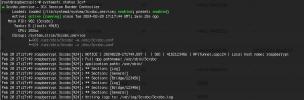
Ive got it running on a pi5 somewhat.

1708449675615.png


It doesn't connect yet but it's a step in the right direction.

Steps I have done so far:

apt install gnupg
wget -O- http://downloads-global.3cx.com/downloads/3cxpbx/public.key | apt-key add -
echo "deb http://downloads-global.3cx.com/downloads/debian buster main" | tee /etc/apt/sources.list.d/3cxpbx.list
apt update && apt install net-tools dphys-swapfile htop mtr screen curl dnsutils -y
apt-get install 3cxsbc

Then you need to edit the config file:

nano /etc/3cxsbc.conf


The key here is using Raspberry Pi OS lite 32bit. 64bit didn't work at all.

At this point I think it is just a config file error my end but its very promising :)
 
Following on from BennyG's post, I got it working using his instructions after installing the 32bit OS Lite.

In the 3cxsbc.conf I edited the following and rebooted:

ProvLink=https://<3CX PBX hostname>/sbc/<SBC-AuthenticationKey>
 
  • Like
Reactions: GregG_3CX
Following on from BennyG's post, I got it working using his instructions after installing the 32bit OS Lite.

In the 3cxsbc.conf I edited the following and rebooted:

ProvLink=https://<3CX PBX hostname>/sbc/<SBC-AuthenticationKey>
Awesome glad you got it working!

Is the above all you changed in the config file? I haven't had chance to pick this back up yet to get it working. My only other concern was how it would handle SBC updates. It would be great if 3cx could add official support for the pi5 now we know it does work :)
 
Status
Not open for further replies.

Latest Posts

Forum statistics

Threads
111,948
Messages
589,880
Members
164,841
Latest member
erre