


- Joined
- Nov 17, 2022
- Messages
- 2
- Reaction score
- 0
This is actually a repost of https://www.3cx.com/community/threads/rds-citrix-vs-v18-webclient-whats-the-future.116848, which got not a single answer and also got locked down, as well as the associated forum account. As this issue is bugging us more and more, and I've been waiting for an answer on the same question for over a year now, here I go again. I want to be constructive, not a pain in the ass. But I'd like a clear answer. And if the answer is '3CX will stop properly supporting RDS/Citrix' then at least it's an honest answer, and a sign we need to move elsewhere. The V16 clients is starting to show it's age and also the Yealink integration doens't properly work anymore since the latest Yealink USB software versions. I know that's not 3CX's fault maybe, but as we simply can't use V18, somehow it is. Original message below, which more or less was a repost of an even earlier question with no proper answers:
Hi, this is in relation to https://www.3cx.com/community/threads/rds-citrix-and-v18-how-do-you-work-with-it.86492/ and basically the same question still applies. It's been almost a year but I've been unable to get an upate at all.
All our customers are on RDS environments. We have a lot of customers that don't have deskphones but use a 3CX phone app on their local desktop while running the webclient or the v18 client in their Remote Desktop session. Since V18 the 3CX Desktop App registers itself as 'Browser':
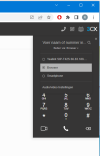
That means, if people run the V18 client on their desktop, and use the webclient from their Remote Desktop session to control it, that won't work. Both the V18 client and the webclient register themselves just as 'Browser' so you can't choose the correct one. So for those clients we still need to install the V16 app, which actually properly registers itself as a 3CX client:
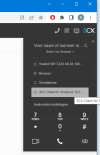
All options we have today have issues when used from RDS.
- Using v16 locally and webclient or V18 in RDS works, but DTMF isn't working and users need to switch between their RD session and locally installed V16 app (try learning your users that);
- Using V18 or the webclient locally and using webclient or V18 in RDS doesn't work at all, both register as 'browser' and you can't select the correct one;
- Using the V16 in the RD session isn't an option at all as you can only select CTI deskphones, but no locally installed 3CX clients or browser-based clients;
V16 still works now, with it's limitations, but it's not maintained anymore, and I think the official download links have been removed (https://www.3cx.com/phone-system/download-links/ only points to V18). On the global download site the old link still works, but it's a version from August 2021, which as said isn't exptected to be updated anymore.
So what's the future of all those Remote Desktop / Citrix users with locally installed 3CX clients? When using actual deskphones, there's a bit more options as you can use either client from your RDS session, but still DTMF doesn't seem to work on any of them when using the webclient to control any 'remote' phone. V16 will at some point be dropped I assume, leaving us in the dark.
So, after about a year of silence, I'd like to ask for the current status and maybe an update again.
Hi, this is in relation to https://www.3cx.com/community/threads/rds-citrix-and-v18-how-do-you-work-with-it.86492/ and basically the same question still applies. It's been almost a year but I've been unable to get an upate at all.
All our customers are on RDS environments. We have a lot of customers that don't have deskphones but use a 3CX phone app on their local desktop while running the webclient or the v18 client in their Remote Desktop session. Since V18 the 3CX Desktop App registers itself as 'Browser':
That means, if people run the V18 client on their desktop, and use the webclient from their Remote Desktop session to control it, that won't work. Both the V18 client and the webclient register themselves just as 'Browser' so you can't choose the correct one. So for those clients we still need to install the V16 app, which actually properly registers itself as a 3CX client:
All options we have today have issues when used from RDS.
- Using v16 locally and webclient or V18 in RDS works, but DTMF isn't working and users need to switch between their RD session and locally installed V16 app (try learning your users that);
- Using V18 or the webclient locally and using webclient or V18 in RDS doesn't work at all, both register as 'browser' and you can't select the correct one;
- Using the V16 in the RD session isn't an option at all as you can only select CTI deskphones, but no locally installed 3CX clients or browser-based clients;
V16 still works now, with it's limitations, but it's not maintained anymore, and I think the official download links have been removed (https://www.3cx.com/phone-system/download-links/ only points to V18). On the global download site the old link still works, but it's a version from August 2021, which as said isn't exptected to be updated anymore.
So what's the future of all those Remote Desktop / Citrix users with locally installed 3CX clients? When using actual deskphones, there's a bit more options as you can use either client from your RDS session, but still DTMF doesn't seem to work on any of them when using the webclient to control any 'remote' phone. V16 will at some point be dropped I assume, leaving us in the dark.
So, after about a year of silence, I'd like to ask for the current status and maybe an update again.


