


- Joined
- Oct 9, 2019
- Messages
- 44
- Reaction score
- 19
Thought I'd document this since it took quite a while to find today.
In version 16, you would get an email every day confirming that the backup is successful. If you upgrade to version 18, the success emails stop.
I know a lot of people were clamoring for no more success emails. I prefer to have the success emails—if I don’t get an email, I know something is wrong. I understand that for someone managing a large fleet of 3CX installations, the success emails could get overwhelming. For that, I'd suggest an independent daemon to check once a day for a successful backup and send an email if it’s missing, i.e. you'd have three options: email on failure, email on success, and email on missing success.
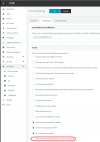
In any case, if you want the success emails again in v18, go to Settings > Email > Notifications tab and tick the box “Notify when Scheduled backups are created successfully.“
Hope that's helpful to others who like the success message,
In version 16, you would get an email every day confirming that the backup is successful. If you upgrade to version 18, the success emails stop.
I know a lot of people were clamoring for no more success emails. I prefer to have the success emails—if I don’t get an email, I know something is wrong. I understand that for someone managing a large fleet of 3CX installations, the success emails could get overwhelming. For that, I'd suggest an independent daemon to check once a day for a successful backup and send an email if it’s missing, i.e. you'd have three options: email on failure, email on success, and email on missing success.
In any case, if you want the success emails again in v18, go to Settings > Email > Notifications tab and tick the box “Notify when Scheduled backups are created successfully.“
Hope that's helpful to others who like the success message,


