Record button.

Status
Not open for further replies.

BesOn

Joined
Jan 21, 2016
Messages
16
Reaction score
0
Hello. Working on call center project with 3CX VAD. There must be a function when a customer want to leave message. Offer or complain. Checked topics here where problem with record function appeared. Did not helped for me. Please help. What am I doing wrong :(

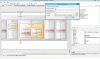
File Name: 'C:\\ProgramData\\3CX\\Instance1\\Data\\Http\\Interface\\ivr\\DataFolder\\1.wav'

I attached a screen.

BR, BesOn.
 

Attachments

  • Untitled.png
    Untitled.png
    218.6 KB · Views: 4,630
Hi there,

Try changing the file name expression to:
'..\\DataFolder\\1.wav'

Also, change the Save to file expression to:
true

(without quotes).

If you still have problems, please explain it in detail, and check the following troubleshooting guide in order to try to understand where the problem is:
http://www.3cx.com/blog/docs/troubleshooting-vad-applications/

Kind regards.
 
Ok. I will try and give you a reply about it.
 
Worked for me :) Thank you very much. What about the name of files? I tried this function:

http://www.3cx.com/blog/docs/emails-from-vad/
CONCATENATE(‘CallFrom_’,session.ani,’.wav’)

Wrote it like this:
CONCATENATE(‘..\\DataFolder\\','CallFrom_',’.wav’)

I want the record function to save .wav file with the name of caller. For instance CallerNumber_Date.wav, Like 3CX program it does.
 
Worked for me with this function:

CONCATENATE('..\\DataFolder\\',session.ani,'.wav')

If the caller number for ex 35875
Saves file like this 35875.wav

Maybe it will help to someone in the future

Thanks.
 
Status
Not open for further replies.

Forum statistics

Threads
112,322
Messages
591,889
Members
165,470
Latest member
Robert Lee