


- Joined
- Apr 12, 2019
- Messages
- 28
- Reaction score
- 3
Hi All,
The management console is not displaying the remaining space on the recordings section, it just shows as -
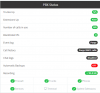
The drives are mounted and the correct usable space is shown when using df -h on the command line. Recordings work fine but just stop when it runs out of space, no notifications as it cannot see the space remaining.
How do I get 3cx to see the space remaining?
The management console is not displaying the remaining space on the recordings section, it just shows as -
The drives are mounted and the correct usable space is shown when using df -h on the command line. Recordings work fine but just stop when it runs out of space, no notifications as it cannot see the space remaining.
How do I get 3cx to see the space remaining?


