Register handsets with SNOM M900. Where to find the auth id and auth password in 3CX V20?

Kerckhaert | Niels

Premier Customer
Joined
Dec 17, 2021
Messages
19
Reaction score
2
hi all,
we have upgraded to V20.
Even our Snom Dect station.
the only thing is when i add a new M85 dect phone to a user, i can not find the Auth id and password to register the sip.
in V18 i could find this information on the user.
Can someone tell me where to find or is there a different way to to?
thanks
Niels
 
Hi,

You add the new user (that you want the M85 to have) first in 3CX under your DECT device.

Then you reboot the DECT device so it can provision itself automatically with everything including the auth ID and password.

Once this is done, you need to pair your handset to the base.

Everything is covered here: https://www.3cx.com/sip-phones/snom-dect-phones/
 
Hi John, the weird thing is this does not work.
I added the users, rebooted the Dect stations (Multi cell).
But in the extensions tab nothing shows up.

With v18 we had to add new extension, fill in the number and the auth id and password.
Then we could register.

now somehow it does not register when i follow the manuel you send me.

Am i missing something?
Maybe a setting in the SNOM dect which prevents the device from provisioning the newly added users?
 
Are the SNOM base local to the pbx? How is it provisioned?
 
FYI: our 3CX system runs in our DMZ (external ip and hoste name).
We have a dect system in head office (local lan)
Have a dect system in 2 branch offices.

All of them work the way i described, for now it showed up after the v20 upgrade we can not view any auth id and pw anymore while adding a new user.

Even better for me when the dect systems scans for new users, but i am probably overseeying something.
 
You need to provision it over an sbc in this case. As long as your SNOM base is not local to the pbx.
 
aha ok. Is this new to V20 then?
And are there any howto's on the sbc part?
 
ok thnx.
The strange thing is.... the 3CX system sees the Dect master and lightens up green....

Provision link is also reachable from the branch side....

But i will look into the SBC setup
 
Provision link is also reachable from the branch side....
The link is always reachable from everywhere. But the SIP register of your extensions are going over an sbc tunnel. This is only necessary if your DECT base is not in the same network as your pbx. If your offices are connected by vpn, than you can use it as before.
 
With v18 we had to add new extension, fill in the number and the auth id and password.
Then we could register.

Hi Niels,

You were basically doing everything manually, that's why the auto provisioning did not work now.
I think it may be a good idea to start clean, it will be worth it in the long run since you will be set up the supported and tested way.

As for the DMZ, if it makes the PBX appear remote to the phones then yes, you will need an SBC.

What's worse is that if they used to work and you didn't know why/how they did it, there is a hidden "gray area" in your setup that can lead an unwanted situation.
 
  • Like
Reactions: bitn2
Thanks for the reply.
The PBX is reachable for the DECT system from with out network via our firewall.
We got rules for them.
Maybe i am overseeying some for the auto provisioning....
Why did 3CX take out the manual option?
Because of security?
 
Thanks for the reply.
The PBX is reachable for the DECT system from with out network via our firewall.
We got rules for them.
Maybe i am overseeying some for the auto provisioning....
Why did 3CX take out the manual option?
Because of security?
Correct, because if security. You need to use an sbc or router phone.
 
hi, finally got the chance to pick this issue up, because of new users, so new dect handsets.
We are now running a SBC, the SBC is setup and green/connected confirmed.

We updated the SNOM dect on site A (site A is connected via ipsec VPN).
Removed the old entry of the dect in our 3CX v20 system and readded with SBC as Routing device.

But nothing happens.
The dect stays red and unprovisioned.

What i see in the logs of the SNOM M900 dect is the following:

RemCfg: Attempting fetch of file: https://3cxserverurl:5001/provisioning/xlxaigi87e3yi4g

RemCfg: Error loading file

Seems like the file is not picked up correctly.
Looking into this issue for allmost a whole day, started from beginning like 5 times, but missing something.....

Maybe someone can advice...

thanks
 
That means that your URL is not accessible to the base from its network connection, I think that much is obvious.

The base needs to be able to access the PBX to download the config, and then it needs to be able to access the SBC to register.

Since you are using a VPN, you need to look into Split DNS
https://www.3cx.com/blog/releases/split-dns-on-prem/

Also try download the config file yourself to confirm that it is downloadable in the first place. Use the config URL and add cfg+MAC in the end like this:

https://3cxserverurl:5001/provisioning/xlxaigi87e3yi4g/cfg0123456789
 
hi John,

our 3CX system is in our DMZ and only has a public ip address.
No internal one.

With a firewall rule for our internal clients.
So the split tunneling should be no issue for us.

The url + cf and max is downloadable.

What is the correct url to put in the SNOM900?
Juts the provisioning link the 3cx DECT entry shows? or do we need to add the filename field too?
 
You can use only the link and the device knows to how to build the entire link by adding the rest automatically during the request (assuming you added the MAC correctly).

But perhaps while your PC can download the file, the Snom base might not be able to do so.

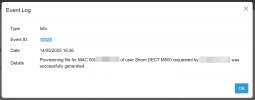
You can reboot the base and see if it actually downloads the file from the 3CX Event log (confirm timestamp).

1747232159477.png
 
And in fact I forgot to mention, we also support RPS provisioning on these models.

So after you add it you will see that the MAC was delivered to RPS in the Event log.

Once the device is reset, it will contact Snom and get the provisioning URL automatically.
 
thanks.
I do not see the message provisioning file from the SNOM M900.
I do see the message from my pc.

Checking our firewall i do not even see the M900 pass.

Strange because it have allways worked (manual).
Can we set some more in the SNOM? maybe i have forgotten somethinjg
 
Ok so that makes it more clear now. If everything was done as we discussed, you don't need to touch anything on the Snom, just reset it and it will connect via RPS.

With 3CX FQDN and certs I can confirm that this works, but I see you are using custom FQDN and certs. You have to ensure the Snom device trusts your CA, and that it can reach the PBX over the public IP. The SSL chain must also be complete even if it does support your CA.
 

Forum statistics

Threads
112,148
Messages
590,962
Members
165,168
Latest member
Stephan Eusebe