


- Joined
- Jul 16, 2019
- Messages
- 2
- Reaction score
- 0
We are running the latest version of 3CX and trying to get the webmeeting remote control feature to work. We were able to make the feature work on 1 PC, but not on various others.
Info:
On all except for this one PC there is a problem with giving access. Once users accept the first "request remote control" popup, the browser should ask for permission to launch 3CXWMRemoteControl app (see screenshot), but this request never appears on all but 1 PC we have tested.
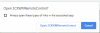
We tried different organizers, entering through links and via webclients, restarting browsers, restarting PCs, allowing all possible permissions for the website in chrome. It is as if webmeeting web doesn't see the app and can't link to it.
On one computer after a restart, the WM actually asks to install the app again and again - as if it was not installed. We tried installing the app under local and domain admin, but all in vain. The other PCs don't ask to reinstall the APP, but it simply don't show the request to open it.
Please can someone help resolve this issue?
Info:
- 3CX Version: 16.0.910
- All clients are running Windows 10, Chrome Version 75.0.3770.142 (Official Build) (64-bit)
- Installed both the 3CX Click to Call plugin and the downloaded 3CXWMRemoteControlSetup.exe
- Both client computers are in the same local network
- The 3CX server is hosted outside our network
On all except for this one PC there is a problem with giving access. Once users accept the first "request remote control" popup, the browser should ask for permission to launch 3CXWMRemoteControl app (see screenshot), but this request never appears on all but 1 PC we have tested.
We tried different organizers, entering through links and via webclients, restarting browsers, restarting PCs, allowing all possible permissions for the website in chrome. It is as if webmeeting web doesn't see the app and can't link to it.
On one computer after a restart, the WM actually asks to install the app again and again - as if it was not installed. We tried installing the app under local and domain admin, but all in vain. The other PCs don't ask to reinstall the APP, but it simply don't show the request to open it.
Please can someone help resolve this issue?


