Solved Remote Extension not working

Status
Not open for further replies.

thelearningowl

Customer
Joined
Mar 19, 2020
Messages
22
Reaction score
4
Hello there,

I could already successfully install the update to the V16 but unfortunately I can't manage to set up an external extension. I tried to provision the softphone within the lan which
works fine, I can accept calls and make calls. However if I switch the wlan it doesn't work anymore :(

Installed the 3CXphoneforwindows on a Windows 10 laptop, set up an extension and put in the welcome email

I read the guideline on how to provision an exterenal extension (https://www.3cx.com/docs/manual/configuring-ip-phones/#h.ul2fzupi6t22/) but they didn't do it for a softphone. What can I do
to make the softphone work? I appreciate any help :)
 
Under Options for the extension have you unticked 'Block Remote Tunnel Connections (3CX App connections with Tunnel enabled & SBC will be blocked)'

Have you opened up the required firewall ports - https://www.3cx.com/docs/manual/firewall-router-configuration/

Does the firewall test pass ?

Can you access the 3CX Management console externally, using fqdn ?
 
Hi @thelearningowl

As mentioned above, the firewall checker on the dashboard should answer your question.

By default, the 3CXPhone for Windows app will use your PBX port 5001 (for configuration and presence) and port 5090 to tunnel the calls. These would need to be verified to be open by the firewall checker because without them, the app cannot reach the PBX to make calls.

Also as @Saqqara mentioned, the option to block the tunnel must not be ticked for the specific extension. Run the firewall checker and delete/recreate the extension to start from scratch if you want it to go back to defaults.
 
Thank you all for your answers! Tried the links but the firewall test won't pass, I'm starting to go crazy

I configured my Fritzbox 7490 according to the instructions, then I restarted it and also set up my Asus router with the port forwarding. Strangely enough, however, the telephones in the LAN work perfectly.

You'll probably say I have to configure the firewall but I don't what else to do. I did it exactly as describe in the link.

Does anybody have an idea what I can do? Thanks a lot :)


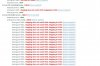
3CX_Port_Forwarding_Error.jpg
 
So to clarify, you have the fritzbox as a modem from the provider, and then you attach the asus as a second router?
 
So to clarify, you have the fritzbox as a modem from the provider, and then you attach the asus as a second router?

Yes that is correct. Don't ask me why my boss wants it like that.. :/
 
Ok, then I suggest to remove any and all port forwards from the FRITZ!Box, and then enable only a single setting for the Asus router to work in "exposed host" mode (the equivalent of DMZ)

On FRITZ!Box, ensure you enable Advanced view so you can see all the settings.
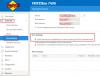
The go to: Internet > Permit Access > Port Sharing
1585825947839.png

Once you do this, the Asus router will have open access to the internet and bypass the FRITZ!Box firewall.

Now, you go to the Asus interface, and start controlling the port forwards from there. The above assumes that the FRITZ!Box provides internet, the Asus box WAN port is connected to LAN1, 2 or 3 of the Fritz, and that the PBX be connected to the Asus box LAN ports, and that you will forward the ports from the Asus box as seen here: https://www.3cx.com/docs/ports/

If the above prerequisites are not as I described, I expect it to fail. Can you please check my suggestion and confirm if this can be done?
 
Ok, then I suggest to remove any and all port forwards from the FRITZ!Box, and then enable only a single setting for the Asus router to work in "exposed host" mode (the equivalent of DMZ)

On FRITZ!Box, ensure you enable Advanced view so you can see all the settings.
The go to: Internet > Permit Access > Port Sharing
View attachment 15273

Once you do this, the Asus router will have open access to the internet and bypass the FRITZ!Box firewall.

Now, you go to the Asus interface, and start controlling the port forwards from there. The above assumes that the FRITZ!Box provides internet, the Asus box WAN port is connected to LAN1, 2 or 3 of the Fritz, and that the PBX be connected to the Asus box LAN ports, and that you will forward the ports from the Asus box as seen here: https://www.3cx.com/docs/ports/

If the above prerequisites are not as I described, I expect it to fail. Can you please check my suggestion and confirm if this can be done?

I did everything as you described and now the firewall check works partly guess thats a little better :D
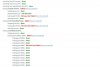
3CX_Port_Forwarding_Error_v2.jpg
Some ports work fine and some get "full cone test failed"
What can I do now?

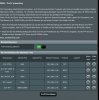
I configured the following port forwarding in the Asus router
Port_Forwarding_3CX_Asus_Router.jpg
 
Nice! For the ones that failed, are they forwarded the same way on the Asus (both TCP/UDP mode)?

Does the FRITZ!Box have phone lines of its own configured that are provided by your ISP? They may be utilizing port 5060 for their own telephony, or something else.

A point on SIP ALG / SIP Helper / NAT Helper:

This is a service provided by many routers/modems to attempt and help SIP work, but often they cause problems by modifying the packets the PBX sends. This needs to be disabled. Google your Asus model and "disable SIP ALG" to find out how to turn that off completely (either through the web interface or through telnet commands).

These "helper" services often may work or may not, and the firewall-checker usually catches them but depending on the manufacturer, they may make the changes in a way that are not always caught by the checker, yet still cause failures.

Can you post a screenshot of the Asus port forwards page and one of the WAN-NAT Passthrough page?
 
Nice! For the ones that failed, are they forwarded the same way on the Asus (both TCP/UDP mode)?

Does the FRITZ!Box have phone lines of its own configured that are provided by your ISP? They may be utilizing port 5060 for their own telephony, or something else.

A point on SIP ALG / SIP Helper / NAT Helper:

This is a service provided by many routers/modems to attempt and help SIP work, but often they cause problems by modifying the packets the PBX sends. This needs to be disabled. Google your Asus model and "disable SIP ALG" to find out how to turn that off completely (either through the web interface or through telnet commands).

These "helper" services often may work or may not, and the firewall-checker usually catches them but depending on the manufacturer, they may make the changes in a way that are not always caught by the checker, yet still cause failures.

Can you post a screenshot of the Asus port forwards page and one of the WAN-NAT Passthrough page?

I disabled SIP ALG on the Asus router and now every port from 9000 to 10999 passes the test. At least some great news ^^

Only port who still fails is port 5060 but that depends on the Fritzbox right?
 
  • Like
Reactions: JohnS_3CX
I noticed your screenshot has forwarded SIP ports 5062 and 5063, but the firewall checker is running on 5060.
1585834769184.png
Can you change it to show 5060 to 5061 and try again? If not, proceed below:


If not, try what @Saqqara suggested as a test, but be aware that removing numbers and disabling telephony on the modem may work only temporarily (and you may need to use those numbers anyway for other reasons). When your ISP routinely reconfigures the modem, they may come back as reconfigured. There is a permanent solution for that: reinstall 3CX from a backup and choose different SIP ports like 6060 for example so that you never clash with the ISP settings.
 
changed it to 5060 to 5061 but still won't pass the firewall checker :(
3CX_Port_Forwarding_Error_v3.jpg

What @Saqqara suggests sounds good but I think it is easier for me to change the sip port. If I reinstall and then import the backup, will my settings be preserved? Or will I have to reconfigure everything?
Thanks again for the help!
 
Run a full backup, download it off the machine for safe keeping (otherwise it will be lost).

Then reboot the machine and reinstall. During the installation web configuration tool, when it asks you, you must not choose new install, instead choose restore from backup.

At the next screens you will be given the choice to select SIP ports again, and now you can pick something other than 5060. All your settings will be preserved in the backup except the automatic backups option (if you were using it). Just set that one option again if needed.
 
BTW you SIP port forward must be both TCP&UDP
 
  • Like
Reactions: thelearningowl
BTW you SIP port forward must be both TCP&UDP

After I set the SIP port to TCP&UDP the firewall check passes port 5060 so I guess thats good news :)
Now I got to get those remote extensions up :D
 
  • Like
Reactions: JohnS_3CX
That should be the easy part now,

I hope so.. just follow the guide from 3CX right? please excuse my stupid questions :)
 
Great news, so you just needed to configure your firewall correctly, especially since you pass through 2 firewalls.

Take a screenshot of your firewall settings and keep it somewhere safe in case you need to upgrade/change your network boxes.

Are the remote extensions using the the 3CX Windows app?
 
  • Like
Reactions: thelearningowl
Status
Not open for further replies.

Forum statistics

Threads
111,974
Messages
590,081
Members
164,899
Latest member
mazet