reused extension caches old display name and chat history

Status
Not open for further replies.

Mitch Keijbets

Bronze Partner
Advanced Certified
Joined
Jan 29, 2018
Messages
20
Reaction score
0
Hi,

We have found a issue with our 3cx chat function. This kinda looks like a security breach. When a employee leaves the company we delete his/her extension in 3cx. When a new employee starts we re-use the extension number 205 for example.

When he/she opens up the 3cx client the chat function contains the chat history of the previous employee. Also we he or she sends a chat message the name in the chat window (right part of the chat screen) shows the old employee's name. The name in the left part of the screen and the top part of the screen shows the correct name.

Did anyone also have this issue and how can we fix this?
 
Interesting.... Is it the same for both web client and desktop client?
 
just tested. Both client and webclient are showing old chats. On 2 different installations of 3cx I tested this.
 
I am seeing the same issue on 16.0.1.273 where the reused extension shows previous chat history and the chat window lists the old user in the right had pane. The left pane shows the correct/current information.
 
Try the regenerate option in the extension menu for that extension. See if the info is still there after that.
 
Try the regenerate option in the extension menu for that extension. See if the info is still there after that.

Tried the regenerate option but did not work for me.
 
Did you regenerate the extension, delete it, and recreate it?

Yeah just tried it. Regenerate --> delete --> recreate. Sign in to the webclient and the chats are still there.
 
Makes sense that it would be. Regenerate only touches the credentials. 3CX really needs to offer the ability to reset an extension and nuke data. This has been requested for a while because of old voicemails and greetings and the addition of chat features just adds more data to be purged when extensions are re-used.
 
Just got a confirmation from 3cx.

Indeed there can be chat leftovers on extension deletion.
R&D is aware of this issue and the extension deletion process has been addressed in the upcoming release (v16 Update 3).
In the meantime until the release is published publically, what the admins can do if reallocating previously owned extension numbers, is to purge Chats manually for everyone before creating new extensions.
To do so you can go on Dashboard / Chat - click the button to enable chat log (if was disabled), click the new Purge button, then disable chat log again (if was disabled).
 
Hi Mitch,

We looked into it and this will be addressed in the following update so the chats can also be removed when deleting the extension, but recordings will remain in the management console in case they are needed.

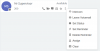
For now if you will repurpose an extension to a new person, I would suggest to make use of the "Assign" or "Clear" function in the web client (requires receptionist rights) which works for Hotel environments where you don't want to keep anything.

11372

Assign/Clear will wipe the extension including recordings so keep that in mind if you must keep them.
 
  • Like
Reactions: Mitch Keijbets
Status
Not open for further replies.

Forum statistics

Threads
111,931
Messages
589,804
Members
164,803
Latest member
fcentral