Ringtone.wav location for v18

Status
Not open for further replies.

dgreer

New User
Joined
Feb 17, 2022
Messages
2
Reaction score
0
I recently upgraded to v18 of the desktop client from v16 and would like to replace the ringtone.wav file with one I've edited to be quieter. I found one in C:\ProgramData\3CXPhone for Windows\PhoneApp\temp\Sounds but after replacing and restarting the app, it has not affected the ringtone sound. Where does this file live in the updated version of the app? Or is there a way to turn down the volume of the ring?
 
Hi @dgreer,

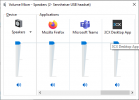
I'd like to clarify this further. From my understanding, I think that you may be confusing the new Desktop App with the legacy Windows Client that you have installed as well. The 3CXPhone for Windows folder is for the legacy Windows Client, while the Desktop App sound will have to be managed by the Windows system volume, if you dial something like *888 (default for 3 digit-length PBXs - can be verified in the System Extensions from within the Dashboard) then you will see the Desktop App appear in the Windows Volume Mixer:

1645171804613.png
 
Just to confirm, there is no way to modify the ringer volume independent of the call volume in the new Desktop App?
 
Hi @dgreer, for the Desktop App, that is correct. What you may be able to do is change the ringer device and have it ring through your screen / laptop for example and answer it using your headset
 
Status
Not open for further replies.