- Joined
- Feb 17, 2022
- Messages
- 2
- Reaction score
- 0
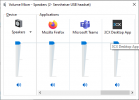
I recently upgraded to v18 of the desktop client from v16 and would like to replace the ringtone.wav file with one I've edited to be quieter. I found one in C:\ProgramData\3CXPhone for Windows\PhoneApp\temp\Sounds but after replacing and restarting the app, it has not affected the ringtone sound. Where does this file live in the updated version of the app? Or is there a way to turn down the volume of the ring?