Role and rights

Status
Not open for further replies.

Forum User

Bronze Partner
Joined
Oct 7, 2019
Messages
19
Reaction score
4
I have a question about the roles and rights system as it does not appear to be working the way we thought it would.

A user wants to control the holiday times for his company by using the webclient. We gave him the manager role so he gets the admin option in his webclient and there he can add holidays in the office hours section. User went along and added the holidays.

Now when a call comes in the PBX, the queues still get called and the holidays put in by the manager do not seem to work? How is this possible?

The PBX is on version 18, build 312.
 
Hi,

Things have changed a bit, you are now controlling the group options basically, not the global PBX settings like you used to in the past, so you have to start thinking in groups terms.

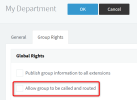
So when you set routings and/or office hours in a group via the WC Admin, this option gets activated in the background for your group:
1683106860685.png

This means that the trunk calls reaching your queues, must be programmed to go via the group first.
If you are bypassing the group by directly sending the calls to the queues, then the group routing is not going to apply.

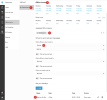
Example:
  1. I selected my new group
  2. Then set the office hours
  3. Assigned a DID (this is the critical part which tells 3CX to route that DID via this group)
  4. Then selected my queue
  5. And also set a holiday
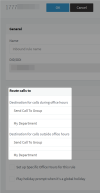
During the holiday it will send my calls to "When office is closed: end call"
I can change this destination to an IVR if needed, so I can play a custom message "Sorry, we are away"

1683107413134.png

Make sure your PBX doesn't already have inbound rules for this DID before you do anything.
Just set the trunk routing to go to a fall-back destination in case you receive calls that don't match any DIDs (ie. to a receptionist)

You will later also notice that an automatic inbound rule was created sending everything to the group. Do not modify this rule.
1683107962784.png

Hope this helps!
 
Status
Not open for further replies.

Forum statistics

Threads
111,974
Messages
590,081
Members
164,899
Latest member
mazet