RTP Ports Issue

Status
Not open for further replies.

TayZaLinZaw

Platinum Partner
Joined
May 30, 2024
Messages
49
Reaction score
5
1726044284603.png
Hi 3CX team ,
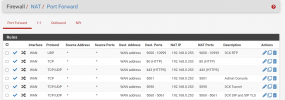
We are facing with this issue on customer site. We already did ports forward in Pfsense firewall.
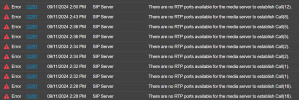
1726044417860.png
How Can be solve this ? please help us guys .
 
Hi

does firewall test pass?
 
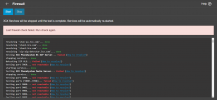
1726044762083.pngFirewall checker did not pass.
 
Did you create the static outbound mapping rule? Step 2 in the manual. Please show your outbound rules.
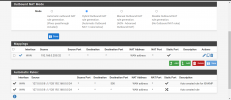
 
Looks correct, do you have a firewall in front of your PfSense? Does PfSense have a public IP as WAN?
 
Did you Change “NAT Reflection mode for port forwards” to “Pure NAT”, activate the “Enable NAT Reflection for 1:1 NAT” checkbox and activate the “Enable automatic outbound NAT for Reflection” checkbox? These settings are in System -> Advanced
 
  • Like
Reactions: Evolute IT
Do you have set ;
  1. Go to System > Advanced
  2. Click Firewall & NAT
  3. Set ‘Firewall Optimization Options’ to Conservative
 
  • Like
Reactions: Evolute IT
I have always used "Manual Outbound NAT" for my port preservation but not sure that's what's causing your issue here. There's no web filtering in play here or ISP cloud firewall?
 
The question has already been asked, but I am asking again because it could be a likely cause.

Are you on double NAT? For instance, does your internet provider include its own router?

If you connect the network cable that is currently plugged into the PFSense to the WAN port... and instead plug it directly into your computer (bypassing the PFSense), do you get a public IP address directly? Is that correct?
 
  • Like
Reactions: Evolute IT
The question has already been asked, but I am asking again because it could be a likely cause.

Are you on double NAT? For instance, does your internet provider include its own router?

If you connect the network cable that is currently plugged into the PFSense to the WAN port... and instead plug it directly into your computer (bypassing the PFSense), do you get a public IP address directly? Is that correct?
The question has already been answered. He already mentioned the PfSense has a public IP address. I believe the issue is somewhere in the NAT settings of the PfSense.
 
I'm assuming this is an "out of the box" pfsense setup, no additional packages installed, no limiters applied etc?

I do remember a long time ago, when first setting these pfsense boxes up, we had to disabled ipv6 as it caused all sorts of issues, Ive always stuck to that rule
 
The question has already been answered. He already mentioned the PfSense has a public IP address. I believe the issue is somewhere in the NAT settings of the PfSense.

Indeed, but I must emphasize the question: if the guide was followed step by step, it should work.If the problem persists despite following all the steps in the guide, a restart of PfSense might be necessary.

Or, PfSense could be located behind another NAT.

What is the version of PfSense?
 
@TayZaLinZaw best open a case with 3CX Support for further investigation. The error you posted originally is before the firewall - the PBX itself has run out of ports on the host.

The firewall check failure is another issue by itself which also needs to be resolved after the first one.
 
Did you find a solution to this? Interested to know as we use pfsense a lot, just in case we stumble across a similar issue
 
Did you find a solution to this? Interested to know as we use pfsense a lot, just in case we stumble across a similar issue
The issue is still persist.
 
Status
Not open for further replies.

Forum statistics

Threads
112,285
Messages
591,704
Members
165,406
Latest member
ARKC