- Joined
- May 30, 2024
- Messages
- 49
- Reaction score
- 5
Hi 3CX team ,
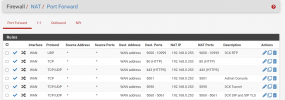
We are facing with this issue on customer site. We already did ports forward in Pfsense firewall.
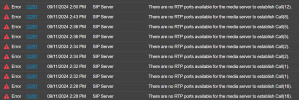
How Can be solve this ? please help us guys .


Yes, I followed that manual .Did you follow the maual? https://www.3cx.com/docs/pfsense-firewall/
What are you using in front of your pfsense? Maybe another router? Double NAT?

Did you create the static outbound mapping rule? Step 2 in the manual. Please show your outbound rules.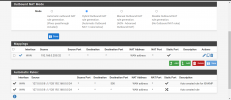
Yes , We have public IP as Wan.Looks correct, do you have a firewall in front of your PfSense? Does PfSense have a public IP as WAN?

The question has already been answered. He already mentioned the PfSense has a public IP address. I believe the issue is somewhere in the NAT settings of the PfSense.The question has already been asked, but I am asking again because it could be a likely cause.
Are you on double NAT? For instance, does your internet provider include its own router?
If you connect the network cable that is currently plugged into the PFSense to the WAN port... and instead plug it directly into your computer (bypassing the PFSense), do you get a public IP address directly? Is that correct?

The question has already been answered. He already mentioned the PfSense has a public IP address. I believe the issue is somewhere in the NAT settings of the PfSense.

The issue is still persist.Did you find a solution to this? Interested to know as we use pfsense a lot, just in case we stumble across a similar issue
Did you open a ticket with 3cx? They could help you as @JohnS_3CX allready said.The issue is still persist.
Founded in 2005, when VoIP was an emerging technology, 3CX has gone on to establish itself as a global leader in business communications.