Run call flow during holiday period

Status
Not open for further replies.

Rob Novotny

Bronze Partner
Basic Certified
Joined
Sep 5, 2018
Messages
70
Reaction score
10
Hi guys,

Just getting my head around the CFD.

I have created a number of call flows successfully and they work well.

With the Christmas madness, I have a number of clients that want messages created for their closure period which I have created using the CFD. What I can't seem to work out is how to run that CFD message during their holiday break.

For example, I have one that says that they are closed from this date to another date. To get it to run, I manually change both incoming routes to the CFD message, and then off again after their holiday break.

Is there a way to automate this because I can set up the holiday dates and times but there is no way to run the CFD message?

Thanks, Rob.
 
Hi Rob,

Instead of having separate CFD apps, you can integrate all the messages in a single CFD app, and use the Date & Time Conditional component to select what to do depending on the current date & time. Please check this guide for more details:
https://www.3cx.com/docs/cfd-time-based-routing/

You can also do this with separate CFD apps. In that case, depending on the date & time you transfer the call to the appropriate CFD app's extension to handle the call accordingly.
 
  • Like
Reactions: Evolute IT
Thanks for the reply edossantos.

I actually had a play with the date and time condition and got it working quite well after a few tries (I created one for my 3CX system as a test and it works really well!).

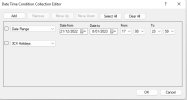
Just another question if that is OK, when creating the date and time collection, is it possible to create the following set up:
  1. The first one: December 21 at 1700 to January 8 at 2359
  2. A second one for all other 3CX holidays listed in the system
And have the first one run normally and then all other 3CX holidays after that:

1671539625239.png

And would it also be possible to have different messages for each time period?

Thanks again, Rob.
 
Thanks for the reply edossantos.

I actually had a play with the date and time condition and got it working quite well after a few tries (I created one for my 3CX system as a test and it works really well!).

Just another question if that is OK, when creating the date and time collection, is it possible to create the following set up:
  1. The first one: December 21 at 1700 to January 8 at 2359
  2. A second one for all other 3CX holidays listed in the system
And have the first one run normally and then all other 3CX holidays after that:

View attachment 33260

Thanks again, Rob.
You'll need to use two branches to route differently for each date ranges. Otherwise both will follow the same conditional branch.
 
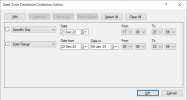
The first one: December 21 at 1700 to January 8 at 2359
For this, you will need 2 rows, as follows:
1671539853042.png

The CFD will evaluate each row independently, and merge the conditions with an OR expression. So the branch will be executed when at least 1 row matches the current date & time.

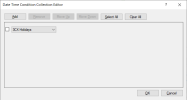
A second one for all other 3CX holidays listed in the system
For this you can use the following condition:
1671539962452.png
 
  • Like
Reactions: Evolute IT
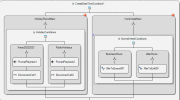
Thanks again for your replies. I went and quickly threw this together:

1671541315679.png

On the left branch: HolidayPeriodMain has no entries

HolidayConditions > Xmas20222023 - date and time period as suggested above

HolidayConditions > PublicHolidays - set to 3CX Holidays

On the right branch: WorkWeekMain has no entries

NormalWeekConditions > BusinessHours - set to 3CX Business Hours

NormalWeekConditions > AfterHours - set to 3CX After Hours

Not sure if this is the right way to set this up as there are no entries in the two main branch entries.

Thanks again, Rob.
 
You need to specify conditions for each branch, otherwise you will not be able to build your app. I don't understand why you need to group this in the branches "HolidayPeriodMain" and "WorkWeekMain". You will probably need to remove that, and just drop the 4 branches in a single Date & Time Conditional component. Branches are evaluated from left to branch, and only the first that matches the current date & time is executed.
 
  • Like
Reactions: Evolute IT
Thanks edossantos.

I'll give this another go in the morning (it's getting late here!).

Thanks again for your time.
 
  • Like
Reactions: edossantos
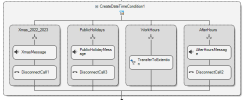
Got it worked out, it's amazing what a little sleep can do!

I set up and tested the following successfully:

1671578128919.png
Xmas_2022_2023 - split time as suggested above.

PublicHolidays - set to 3CX Holidays

WorkHours - set to 3CX work Hours

AfterHours - set to 3CX After Hours

Thanks for your help!

Have a great Christmas and New Year all!

Rob.
 
  • Like
Reactions: edossantos
Good that you have it working.

Merry xmas to you and a great 2023!
 
  • Like
Reactions: Rob Novotny
Status
Not open for further replies.

Members Online Now

No members online now.

Forum statistics

Threads
111,831
Messages
589,277
Members
164,660
Latest member
RJenkinsROCK