Solved SBC Controller

Status
Not open for further replies.

chrisjako

Free User
Joined
Jul 29, 2021
Messages
80
Reaction score
9
I went to a site today and setup a SBC - the install went great on the debian box and I managed to get to the very end with it connecting to my controller successfully then rebooted

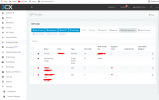
On my 3cx console though it still doesn't seem to register - can anyone advise what i'm doing wrong? thanks!
Capture5.PNG
 
Try a different web browser or in incognito mode
 
Tried edge,chrome incognito and IE11 (yuk) all still same red dots
 
Port forwards on the main PBX or the SBC or both?

I did a firewall check on the PBX and it came back as all ok
 
On the firewall protecting the 3CX server, it needs port 5090 forwarding.

On the firewall protecting the SBC server, no portforwarding is required - just outbound https and 5090 ports
 
  • Like
Reactions: chrisjako
Check your blacklisted IPs too from the front page.
 
There are no blacklists on the PBX server however, both myself and my colleague got blacklisted on first try - at the moment its showing no blacklists
 
When you can just give it a reboot (server)
 
Have you checked the activity logs

I would the SBC has never registered, the second to last field shows when the SBC registered last - on your screenshot this is blank

Working SBC server info

1627569095982.png

Are you sure you entered the correct Provisioning URL and Authentication KEY ID
 
Last edited:
Have you checked the activity logs

I would the SBC has never registered, the second to last field shows when the SBC registered last - on your screenshot this is blank

Working SBC server info

View attachment 23250

Are you sure you entered the correct Provisioning URL and Authentication KEY ID
Yes i double checked, besides, the SBC box told me it found the PBX and finished setup so I must've got it correct
 
Have you actually got any phones registered on the SBC?

can you access the SBC?
 
Hi @chrisjako

Can you navigate to /etc/3cxsbc.conf and check that the information in the config file is correct?

Check the password, provisioning link etc. Make sure it all matches.
 
  • Like
Reactions: chrisjako
Have you actually got any phones registered on the SBC?

can you access the SBC?
None yet, by access it do you mean login via debian (yes) or via a web browser (no) - I can ping the device though from a PC
 
If I was you, i'd SSH on to it and start again.

Code:
sudo apt remove 3cxsbc --purge

Install

Code:
wget http://downloads.3cx.com/downloads/sbc/3cxsbc.zip -O- | sudo bash
 
  • Like
Reactions: VasilisV_3CX
Hi @chrisjako

Can you navigate to /etc/3cxsbc.conf and check that the information in the config file is correct?

Check the password, provisioning link etc. Make sure it all matches.
ok i have checked the conf file - everything looks fine its even pulled through the password from the server
 
Last edited:
Hi @chrisjako,

Do you have 3CX installed on multiple devices using the same license key / fqdn?
 
Last edited:
On the firewall protecting the 3CX server, it needs port 5090 forwarding.

On the firewall protecting the SBC server, no portforwarding is required - just outbound https and 5090 ports
PROBLEM NOW SORTED!!! This was the issue, despite me contacting the third party firewall provider and asking for this to be enabled they hadn't enabled 5090 outbound - a second call to another technician rectified this

thanks everyone for your help!!!
 
Great to hear that the issue is resolved @chrisjako. If you require any further assistance or information feel free to open a new thread!
 
Status
Not open for further replies.

Latest Posts

Forum statistics

Threads
112,324
Messages
591,897
Members
165,476
Latest member
awan05
