Solved SBC down in 3CX server after upgrade from v16 to v18.0.234

Status
Not open for further replies.

Daniel Belciug

Customer
Joined
Nov 20, 2021
Messages
22
Reaction score
2
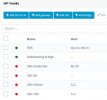
I just upgraded the 3CX server running on W10 from v16.x to v18.0.234. Now I have the next problem: all my SBC connections are down. In one location, I uninstalled the old SBC v16 and installed the new SBC v18, but no success.
I suspect that the tunnel do not bring up.
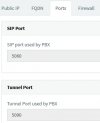
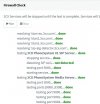
All services are runing fine. The firewall check is ok, including port 5090. I use ports 5060 for SIP and 5090 for tunnel. Any idea, please?
 

Attachments

  • firewal ok.jpg
    firewal ok.jpg
    49.7 KB · Views: 8
  • ports.jpg
    ports.jpg
    16.5 KB · Views: 8
  • SBC down.jpg
    SBC down.jpg
    33.8 KB · Views: 7
I did a fresh install and nou it's ok again. I did a mistake installing the 3CX PBX v18, regarding the FQDN, at the step where is asking to use FQDN or IP. Previously, I selected "No, I do not have a DNS server and will use a local IP". This time, I selected "Yes, I have a DNS server and will configure a single FQDN that works both in and out of the office".
I was confused by the first option.
Thanks again for all your support!
 
Previously, I selected "No, I do not have a DNS server and will use a local IP".
This means that you do not have an internal DNS and for local devices your local IP will be used. So no DNS queries involved.
This time, I selected "Yes, I have a DNS server and will configure a single FQDN that works both in and out of the office".
This implies that you have a local DNS server you can configure and point local devices to the local IP of the PBX using the same FQDN.
So external devices will resolve the public IP of the PBX and local devices will resolve the local IP of the PBX.

Glad to see you got it working though.
 
This means that you do not have an internal DNS and for local devices your local IP will be used. So no DNS queries involved.

This implies that you have a local DNS server you can configure and point local devices to the local IP of the PBX using the same FQDN.
So external devices will resolve the public IP of the PBX and local devices will resolve the local IP of the PBX.

Glad to see you got it working though.
Exactly the same I was understood the meaning of this options, the firs time. But the DNS that I use is not internal!!! I use a DNS from 3cx.ro domain, that is not mine! (my FQDN is: xxxxxx.3cx.ro). Confusing for me was the sentence "Yes, I HAVE a DNS...). I don't have that DNS, I just use it...
 
Then you should have used the option "No, I do not have a DNS server and will use a local IP". This option applies only for local IP configuration and should not affect anything else.
 
Then you should have used the option "No, I do not have a DNS server and will use a local IP". This option applies only for local IP configuration and should not affect anything else.
I selected this option for the first time, and the tunnel didn't work on port 5090 (no service for tunnel started on PBX to listen to port 5090), affecting the connection of SBSs and mobile phones. The second time I selected the other option and everything is fine.
 
Status
Not open for further replies.

Latest Posts

Forum statistics

Threads
111,991
Messages
590,167
Members
164,929
Latest member
Cloudstar