SBC HA Cluster Resources Failed

Status
Not open for further replies.

harv00

Bronze Partner
Basic Certified
Joined
Feb 18, 2019
Messages
5
Reaction score
1
Hi All,

I'm installing an SBC HA cluster and am getting an error after the installation. I installed both SBCs into the cluster then ran the crm status command which came up with the below error. I have tried purging 3cxsbc from both SBCs and am getting the same error after installing only the first SBC again. I have followed the installation guide and both SBCs are in the same timezone and up to date.

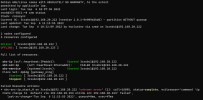
When running the command crm status, the resource sbc-src-ip is marked as failed and the exit reason is as follows:
exitreason='command 'ip route change to default via 192.168.20.254 onlink src 192.168.20.224' failed'

Here's a screenshot of the output.
1662459556299.png

I haven't reinstalled the second SBC into the cluster yet which is why SBC2 is offline.

I've run the journalctl command from the troubleshooting steps in the guide and there is the same error as above and a bunch of unknown errors which doesn't help much. Here's a snippet of the output:
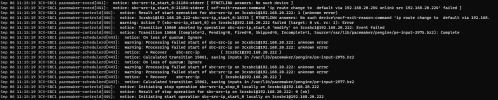
1662461551265.png

If I run ip route show I can see that the ip route table has the correct IP address of 192.168.20.224 (the floating IP for the SBC install).

1662461671277.png

Any help would be appreciated, I hope there's the relevant information here but please ask if I've missed anything. I've tried googling the error and searching the forums but haven't found much.
 
Here's some more information on the setup.

We're running two servers in Digital Ocean with failover running between them. We're using an Enterprise Annual license and are on V18 Update 4. This setup isn't live yet so no phones have been connected, no SIP trunks added, no extensions, etc. I wanted to get the setup working with the SBC HA Cluster before proceeding further.

Hope this helps.
 
Any thing on your network using the addr 192.168.20.224? change the floating ip to any other addr on the same subnet. shot in the dark, grep -R "192.168.20.224" /etc/ or grep -R "192.168.20.224" /var/
 
Any thing on your network using the addr 192.168.20.224? change the floating ip to any other addr on the same subnet. shot in the dark, grep -R "192.168.20.224" /etc/ or grep -R "192.168.20.224" /var/
Thanks for the reply. There isn't anything using that IP on the network. We've setup a test network in our office before deploying so only the SBCs and my laptop are connected.

I've ran those two commands and it's come back with the following. In the /etc/network/interfaces file there is the commented out line which I tried to add manually to resolve this. It broke the network service after I added it so I commented it.
1662469783255.png
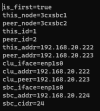
This is the output of the 3cxsbc.info file:
1662470034671.png

The output of grep /var/ came back with loads of errors in the pacemaker service log, here's a snippet of the error:
1662469988695.png
 
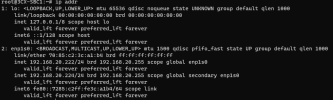
in the last screencap we get a no such device error on what I am guessing is enp1s0, when we look at "ip addr" what devices are listed?
 
in the last screencap we get a no such device error on what I am guessing is enp1s0, when we look at "ip addr" what devices are listed?
Here's the output
1662471878293.png

It's definitely showing both the IP for SBC1 (222) and the floating IP (224) on enp1s0
 
I am out of ideas, if this is classified as a test environment I would just change the ips, maybe test the other sbc, let us know what happens.
 
  • Like
Reactions: harv00
Try setting the actual IP address on the devices to DHCP, adding a reservation in the DHCP server so they do not change, instead of static, then reboot them one at a time and check.
 
  • Like
Reactions: harv00 and nub
Try setting the actual IP address on the devices to DHCP, adding a reservation in the DHCP server so they do not change, instead of static, then reboot them one at a time and check.
Thanks @3cxnub for the help.

Thanks for the reply @Charles_3CX. I changed to DHCP on SBC1 with a reservation and after the reboot the resource was working. I changed SBC2 to DHCP as well and installed the SBC and HA and it also joined the cluster with all resources running.

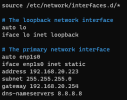
Here's a copy of my /etc/network/interfaces file before changing it back to DHCP, is there something I added incorrectly to cause it to fail?
1662549291199.png
 
Last edited:
  • Like
Reactions: nub
This is nearly the exact issue I was facing. I am using the 3CX published clustering guide to the exact word here.

I found step 8 (Ping Resource) to be the offending service that is failing.
You can monitor the status of the cluster live with 'crm_mon'


I have a fully functional SBC cluster only with selecting "No" for this step.
 
We are currently looking into issues with the sbc cluster so for the moment please follow the steps in my previous reply and assign the IP via DHCP with reservations.
 
  • Like
Reactions: Gwish
We are currently looking into issues with the sbc cluster so for the moment please follow the steps in my previous reply and assign the IP via DHCP with reservations.
We ran into this same issue with latest GA build of SBC running on VMware (Debian Linux). We were able to workaround the issues by setting a static reservation for DHCP for each of the 2 SBC's, we did not have to disable ping. The instructions are very clear about assignment of static IP so if this is a known defect that has persisted for several months, you might consider updating the instructions/guide with this information.
 
  • Like
Reactions: Gwish
We are currently looking into issues with the sbc cluster so for the moment please follow the steps in my previous reply and assign the IP via DHCP with reservations.
Hi Charles - how are you guys getting on with resolving this? Is it in the bug list, reticent to raise it in a ticket if you already know about it. The workaround isn't great for a customer who has a VLAN for their server subnets without a DHCP server. I note there's nothing specific in v18u6 with regards to SBC upgrades?
 
Hi Charles - how are you guys getting on with resolving this? Is it in the bug list, reticent to raise it in a ticket if you already know about it. The workaround isn't great for a customer who has a VLAN for their server subnets without a DHCP server. I note there's nothing specific in v18u6 with regards to SBC upgrades?
You dont yet have an update on this currently, I'm afraid. It is being worked on, but we do not yet have an ETA on when it will be.
 
  • Like
Reactions: unleashed
You dont yet have an update on this currently, I'm afraid. It is being worked on, but we do not yet have an ETA on when it will be.
Thanks - we have a customer awaiting the fix
 
  • Like
Reactions: Charles_3CX
I appear to have the exact same problem in testing with static - I will switch to DCHP and see if that fixes it. Any updates here we really would rather use static. I will report back if this fixes this error for us
 
DHCP appears to clear the error - very much looking forward to this being fixed.
 
Status
Not open for further replies.

Forum statistics

Threads
111,973
Messages
590,079
Members
164,898
Latest member
grahamaskew