


- Joined
- Aug 10, 2018
- Messages
- 28
- Reaction score
- 6
Anyone familiar with SSH client issues?
I ran the most recent 3CX SBC installer through putty on fresh Pi, but I couldn't get past the 3CX SBC prerequisite screen. I tried ENTER, TAB, SpaceBar nothing seems to work.
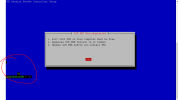
I had to ctrl-c to get out of it. Then the command line didnt show properly past the blue install wizard. See image below.
I closed the connection and i tried using ssh command in Microsoft command prompt.
Everything worked first try with cmd.
This isnt a critical issue, but my team is trained and comfortable with putty. I am hoping to figure out what is going on.
Pi running fresh install of the Pi version of Debian 12. I was accessing it from my Windows 10 desktop.
IDK if this is an issue with putty, the 3CX installer wizard, or something else.
Any ideas would be appreciated.
Thanks
David
I ran the most recent 3CX SBC installer through putty on fresh Pi, but I couldn't get past the 3CX SBC prerequisite screen. I tried ENTER, TAB, SpaceBar nothing seems to work.
I had to ctrl-c to get out of it. Then the command line didnt show properly past the blue install wizard. See image below.
I closed the connection and i tried using ssh command in Microsoft command prompt.
Everything worked first try with cmd.
This isnt a critical issue, but my team is trained and comfortable with putty. I am hoping to figure out what is going on.
Pi running fresh install of the Pi version of Debian 12. I was accessing it from my Windows 10 desktop.
IDK if this is an issue with putty, the 3CX installer wizard, or something else.
Any ideas would be appreciated.
Thanks
David


