


- Joined
- May 17, 2021
- Messages
- 6
- Reaction score
- 2
I moved my enterprise subscription installation from my local machine to the 3cx hosted one.
Everything works great except one thing.
The windows machine that hosted the pbx till the move, is the only machine that cannot connect neither to the management console nor can I install the SBC software on it.
The SBC installs fine on another machine and connects with n o problem with the hosted pbx
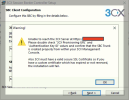
I have attached a screenshot from the message that it gives me when trying to install on the old machine.
I already have:
- flushed my dns
- completely uninstall old installation of PBX and anything 3cx
- reset network settings
any thoughts?
Everything works great except one thing.
The windows machine that hosted the pbx till the move, is the only machine that cannot connect neither to the management console nor can I install the SBC software on it.
The SBC installs fine on another machine and connects with n o problem with the hosted pbx
I have attached a screenshot from the message that it gives me when trying to install on the old machine.
I already have:
- flushed my dns
- completely uninstall old installation of PBX and anything 3cx
- reset network settings
any thoughts?
Attachments
Last edited:


